Intro
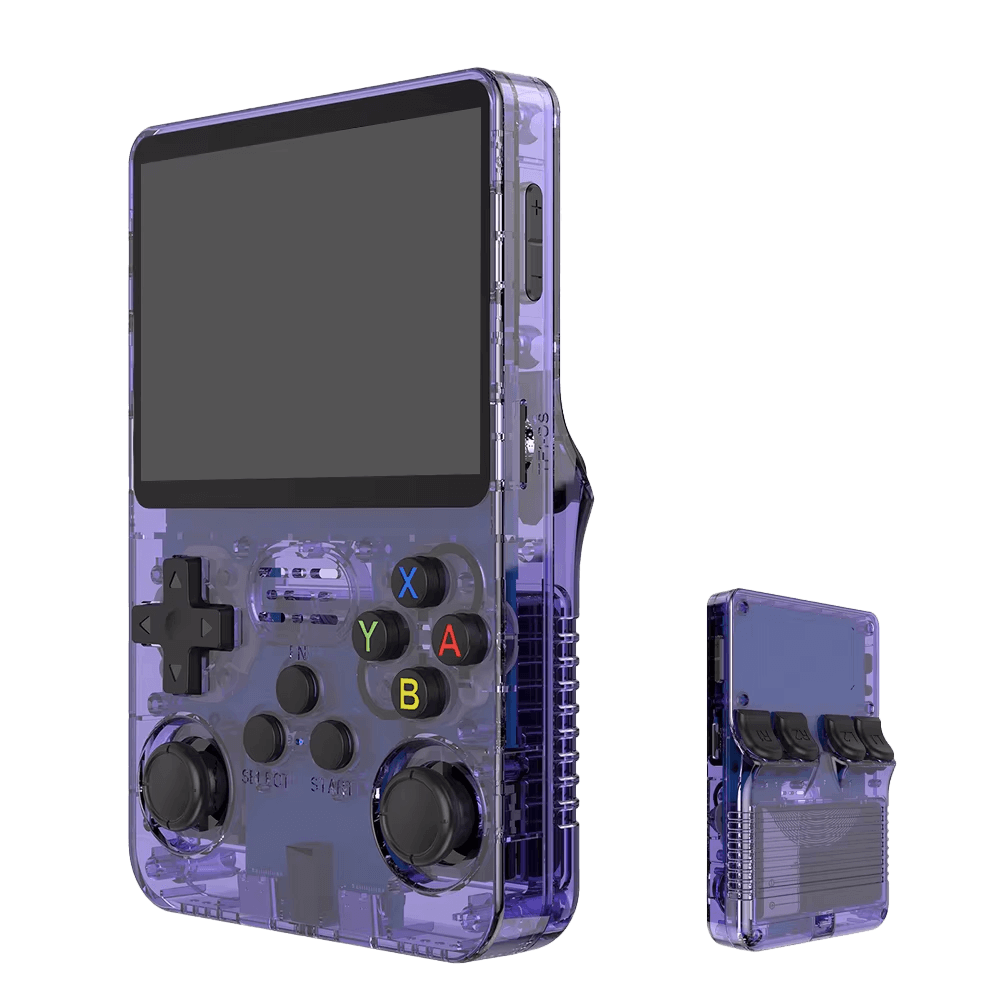
There's something slightly absurd about turning a tiny retro handheld into both an app development platform and a weak-signal radio decoder. The R36S - cheap, hackable, and rough around the edges - wasn't built for any of this.
That's exactly why it works.
The Constraint Advantage
Modern development hides inefficiency. The R36S exposes it.
With limited CPU, RAM, and screen space, you're forced to:
- Write tighter code
- Design simpler interfaces
- Think in constraints, not abstractions
That same constraint-driven thinking applies perfectly to signal processing tasks like FT8.
Start with the Right Foundation: ROCKNIX
Firmware matters more than hardware here.
ROCKNIX stands out as a sanely maintained base:
- Consistent, purposeful updates
- Clean design philosophy
- Predictable behavior
- Modern and maintained Linux kernel
Compared to more fragmented alternatives, ROCKNIX gives you a stable environment - critical when you're experimenting with both development and DSP workloads.
A Playground for Real Systems Learning
Underneath it all, the R36S runs Linux. That opens the door to:
- Writing small C or Python programs
- Building terminal-based tools
- Experimenting with audio pipelines
- Understanding how software meets hardware
This isn't abstracted development. It's hands-on and honest.
Enter FT8: Where Things Get Interesting
FT8 decoding sounds simple - but it isn't.
It involves:
- Continuous audio sampling (
~12 kHz) - FFT-heavy signal processing
- Strict 15-second decode cycles
On a modern PC, this is trivial. On the R36S, it's a stress test.
Can It Actually Do It?
Yes - but barely, and that's the point.
- Sparse bands → decent decoding
- Busy bands → slow decodes (?)
- Full GUI apps → too heavy
- Minimal CLI decoders → surprisingly workable
You quickly learn:
- What "CPU-bound" really means
- How algorithm efficiency affects outcomes
- Why timing and synchronization matter
Learning by Breaking (and Dropping Frames)
The R36S gives immediate feedback:
- Inefficient code → lag
- Bad DSP assumptions → missed signals
- Timing drift → failed decodes
FT8 makes this brutally obvious because it's time-sensitive. You're not just writing code - you're aligning with physics and timing.
Micro-App Thinking Meets Signal Processing
You won't build a full-featured radio suite here.
Instead, you'll build:
- Minimal FT8 decoders
- Audio capture pipelines
- Small utilities for filtering or logging
This constraint teaches modularity in a very real way.
The Hidden Challenge: I/O and Time
FT8 isn't just CPU-bound - it's time-bound.
You'll need:
- Reliable audio input (USB sound card, etc.)
- Accurate system time (NTP or GPS)
Solving these on a constrained device teaches more than any tutorial.
Portable, Hackable, Slightly Unreasonable
There's something uniquely satisfying about decoding real radio signals on a device that fits in your pocket.
With ROCKNIX, that experience becomes:
- Less chaotic
- More predictable
- Still deeply hackable
While we have an Android app that decodes and transmits FT8, it is NOT nearly as fun as this one ;)
Not Efficient - But Deeply Educational
Using the R36S for development and FT8 decoding is inefficient.
That's the entire point.
You gain:
- Real understanding of system limits
- Intuition for performance and timing
- Respect for efficient design
The Strange Advantage
When you return to a powerful machine, everything feels easier - but you think differently.
You:
- Write leaner code
- Design simpler systems
- Understand performance, not just assume it
And maybe most importantly - you'll know that even a tiny, underpowered device can do surprisingly complex things…
…if you meet it halfway.
That's Pocket Chaos.
Initial Forays
Start by installing the stable ROCKNIX release
and then upgrade to the nightly builds. Nightly builds may be required to get
the USB Gadget Mode to work.
R36S clones need the RK3326 -B variant of the images.
RK3326:~ # uname -a
Linux RK3326 6.12.79 #1 SMP Sat May  2 06:28:30 UTC 2026 aarch64 GNU/Linux

RK3326:~ # mkdir /storage/experiments
RK3326:~ # cd /storage/experiments/

# curl --proto '=https' --tlsv1.2 -sSf https://sh.rustup.rs | sh  # OOMs!

# git clone https://github.com/bodiya/wsjtr

<Let the adventures begin!>
// We cross-compiled "./wsjtr" on a different system
RK3326:~/release # time ./wsjtr --wav test_01.wav --passes 1 --keep-wav
032817   7   0.8 1513 ~  JO1COV DL4SBF 73
032817  10   0.8 2138 ~  LZ365BM <...> 73
032817  17   1.2 2279 ~  PY2DPM ON6UF RR73
032817  17   1.7 2390 ~  CQ E75C JN93
032817   3   1.0 1292 ~  EA9ACD HA5LGO -13
032817   4   0.9  823 ~  LY2EW DL1KDA RR73
032817  -1   0.6  955 ~  CQ IU8DMZ JN70
032817  19   0.8 1123 ~  CQ HB9CUZ JN47
032817  -2   1.0 1564 ~  JI1TYA DH1NAS 73
032817  -7   0.8  338 ~  JO1COV PE1OYB JO21
032817   9   0.8 2327 ~  CQ R8AU MO05
032817 -19   1.7 1450 ~  CQ RX3ASQ KO95
032817 -10   0.8  559 ~  OE3MLC G3ZQQ 73
032817   6   0.8 1369 ~  CQ OK6LZ JN99
032817  21  -1.1 2378 ~  R1CBP SP9LKP RR73
032817  -4   0.1 1285 ~  MM0IMC 4U1A -06
032817   5   0.8 1158 ~  CQ HA1BF JN86
032817   3   1.9  771 ~  JA1FWS OK2BV JN89
032817  -4   0.1 1345 ~  CQ 4U1A JN88

real    0m21.356s
user    0m25.235s
sys     0m1.536s
Heh ;)
user@zion:~/repos/ft8_lib_upstream$ cat Makefile
BUILD_DIR = .build

# Cross-compilation support
CROSS_COMPILE ?=
CC = $(CROSS_COMPILE)gcc
AR = $(CROSS_COMPILE)ar

FT8_SRC  = $(wildcard ft8/*.c)
FT8_OBJ  = $(patsubst %.c,$(BUILD_DIR)/%.o,$(FT8_SRC))

COMMON_SRC = $(wildcard common/*.c)
COMMON_OBJ = $(patsubst %.c,$(BUILD_DIR)/%.o,$(COMMON_SRC))

FFT_SRC  = $(wildcard fft/*.c)
FFT_OBJ  = $(patsubst %.c,$(BUILD_DIR)/%.o,$(FFT_SRC))

TARGETS  = libft8.a gen_ft8 decode_ft8 test_ft8

# Base CFLAGS and LDFLAGS
CFLAGS   = -O3 -DHAVE_STPCPY -I.
LDFLAGS  = -lm

ifdef OPTIMIZE
CFLAGS   += -Ofast -mcpu=cortex-a35+crypto+crc -flto
LDFLAGS  += -flto
endif

ifdef FT8_DEBUG
CFLAGS   += -fsanitize=address -ggdb3 -DFTX_DEBUG_PRINT
LDFLAGS  += -fsanitize=address
endif

ifdef STATIC
CFLAGS   += -static
LDFLAGS  += -static
endif

# Optionally, use Portaudio for live audio input
# Portaudio is a C++ library, so then you need to set CC=clang++ or CC=g++
ifdef PORTAUDIO_PREFIX
CFLAGS   += -DUSE_PORTAUDIO -I$(PORTAUDIO_PREFIX)/include
LDFLAGS  += -lportaudio -L$(PORTAUDIO_PREFIX)/lib
endif

.PHONY: all clean run_tests install

all: $(TARGETS)

clean:
        rm -rf $(BUILD_DIR) $(TARGETS)

run_tests: test_ft8
        @./test_ft8

install: libft8.a
        install libft8.a /usr/lib/libft8.a

gen_ft8: $(BUILD_DIR)/demo/gen_ft8.o libft8.a
        $(CC) $(CFLAGS) -o $@ .build/demo/gen_ft8.o -lft8 -L. $(LDFLAGS)

decode_ft8: $(BUILD_DIR)/demo/decode_ft8.o libft8.a $(FFT_OBJ)
        $(CC) $(CFLAGS) -o $@ $(BUILD_DIR)/demo/decode_ft8.o $(FFT_OBJ) -lft8 -L. $(LDFLAGS)

test_ft8: $(BUILD_DIR)/test/test.o libft8.a
        $(CC) $(CFLAGS) -o $@ .build/test/test.o -lft8 -L. $(LDFLAGS)

$(BUILD_DIR)/%.o: %.c
        @mkdir -p $(dir $@)
        $(CC) $(CFLAGS) -o $@ -c $^

lib: libft8.a

libft8.a: $(FT8_OBJ) $(COMMON_OBJ)
        $(AR) rc libft8.a $(FT8_OBJ) $(COMMON_OBJ)
make clean && make STATIC=1 OPTIMIZE=1 CROSS_COMPILE=aarch64-linux-gnu-
RK3326:~/release # time ./decode_ft8 test_01.wav
Sample rate 12000 Hz, 180000 samples, 15.000 seconds
Block size = 1920
Subblock size = 960
N_FFT = 3840
#############################################################################################
Max magnitude: -19.1 dB
000000 +18.0 +1.44 1369 ~  CQ OK6LZ JN99
000000 +15.5 +1.52  709 ~  CQ IK4LZH JN54
000000 +15.5 +1.44 2328 ~  CQ R8AU MO05
000000 +15.0 +1.44  891 ~  SA5QED IQ5PJ 73
000000 +14.5 +1.68 1291 ~  EA9ACD HA5LGO -13
000000 +14.0 +1.52  559 ~  OE3MLC G3ZQQ 73
000000 +14.0 +1.44  338 ~  JO1COV PE1OYB JO21
000000 +13.5 +1.52 1125 ~  CQ HB9CUZ JN47
000000 +13.0 +1.28  956 ~  CQ IU8DMZ JN70
000000 +13.0 +2.56  772 ~  JA1FWS OK2BV JN89
000000 +13.0 +1.52  822 ~  LY2EW DL1KDA RR73
000000 +13.0 +1.68 1566 ~  JI1TYA DH1NAS 73
000000 +12.5 +1.52 2138 ~  LZ365BM <...> 73
000000 +12.5 +1.52 1512 ~  JO1COV DL4SBF 73
000000 +12.5 +2.40 1450 ~  CQ RX3ASQ KO95
000000 +11.5 +1.36 2691 ~  CQ OE8GMQ JN66
000000 +10.5 +1.84 2278 ~  PY2DPM ON6UF RR73
000000 +09.5 +1.36 1616 ~  JO1COV PA0CAH JO21
Decoded 18 messages, callsign hashtable size 26

real    0m0.473s
user    0m0.449s
sys     0m0.013s
Yes - this is more like it!
Something new
RK3326:~ # arecord -l
**** List of CAPTURE Hardware Devices ****
card 0: rk817ext [rk817_ext], device 0: ff070000.i2s-rk817-hifi rk817-hifi-0 [ff070000.i2s-rk817-hifi rk817-hifi-0]
  Subdevices: 1/1
  Subdevice #0: subdevice #0
card 1: DDX [DDX], device 0: USB Audio [USB Audio]
  Subdevices: 1/1
  Subdevice #0: subdevice #0

RK3326:~ # aplay -l
**** List of PLAYBACK Hardware Devices ****
card 0: rk817ext [rk817_ext], device 0: ff070000.i2s-rk817-hifi rk817-hifi-0 [ff070000.i2s-rk817-hifi rk817-hifi-0]
  Subdevices: 1/1
  Subdevice #0: subdevice #0
card 1: DDX [DDX], device 0: USB Audio [USB Audio]
  Subdevices: 0/1
  Subdevice #0: subdevice #0
We will be using R36S to run a small FT8 agent which will talk to DDX and
other connected transceivers.
RK3326:~/release # ./ft8_agent
DISC cat=/dev/serial/by-id/usb-The_DDX_Team_DDX_FB26E57B51E0A7E4-if03
DISC rx_dev=plughw:CARD=DDX
DISC tx_dev=plughw:CARD=DDX
CTY  loaded 10255 prefixes from cty.dat
CAT  startup-current freq=14.074000MHz band=20m
CAT  startup-set freq=14.074000MHz band=20m target=14.074000MHz ok
FT8 agent 0.1 call=VU3CER grid=MK68 band=20m freq=14.074000MHz tx=dry-run arm=runtime-ok audio=1500Hz target=strongest profile=r36s compact=on
BTN  input=/dev/input/event3 name="r36s_Gamepad" controls=A,B,X,Y,SELECT,START,FN usable=yes
BTN  map: A=target B=abort X=target-cycle Y=CQ SELECT=status START=tx-pause START-hold=arm FN+X=band FN+B=clear/disarm FN+START=quit
Keyboard: type 'help' then Enter for runtime commands.
cmd> STAT 033556Z 20m 14.074000MHz rx=pending tx=dry arm=ok idle tgt=strongest qso=0
...
RX   utc=081159Z tick=59/60 slot=14/15
LVL  081145Z rms=-48.4dBFS peak=-33.4dBFS
RX   081145Z -10.6  0.88 2791Hz score=24  YC9CCK BD7KWU -13
RX   081145Z -11.2  0.88 1300Hz score=24  CQ ON4ATW JO20
RX   081145Z -10.1  0.80 1422Hz score=22  CQ A61CK LL75
RX   081145Z -11.6  1.04 2350Hz score=20  CQ LA8ENA JO48
RX   081145Z -10.9  1.04 2225Hz score=19  YO9HP RA8CO R-05
RX   081145Z -12.2  0.88 1656Hz score=17  DU1AZ UR3CTB KN59
RX   081145Z -14.2  1.20 2491Hz score=12  CQ UP81D
AUTO target=A61CK entity=A6 grid=LL75 snr=-10.1 tx-cycle=even policy=strongest action=answer-cq tx="A61CK VU3CER MK68"
TXQ  081200Z band=10m freq=28.074000MHz audio=1500Hz gain=0.80 state=wait-report msg="A61CK VU3CER MK68" DRY-RUN
STAT 081200Z 10m 28.074000MHz rx=-48.4/-33.4dBFS tx=dry arm=ok wait-report tgt=strongest qso=0
...
RX   utc=081228Z tick=28/60 slot=13/15
RX   utc=081229Z tick=29/60 slot=14/15
LVL  081215Z rms=-48.6dBFS peak=-34.2dBFS
RX   081215Z -11.0  0.80 2228Hz score=24  EA3NW RA8CO -04
RX   081215Z -11.1  1.04 2791Hz score=23  CQ BD7KWU OL62
RX   081215Z  -8.8  0.96 1694Hz score=23  R4CAN A61SD +00
RX   081215Z  -9.3  0.80 1425Hz score=22  CQ A61CK LL75
RX   081215Z -13.5  1.04 2606Hz score=18  VK6AAX SP3DV JO83
RX   081215Z -10.6  0.96 2350Hz score=17  CQ LA8ENA JO48
RX   utc=081159Z tick=59/60 slot=14/15
LVL  081145Z rms=-48.4dBFS peak=-33.4dBFS
...
There we go! Live FT8 decoding on the R36S ;)
The propagation conditions aren't the best these days:
% python3 dx.py

═══════════════════════════════════════════════════════
  HF DX INDEX - Current Conditions
═══════════════════════════════════════════════════════
  Updated: 2026-05-09 01:56 UTC

  Band   Now      Rating             Tomorrow
  ────────────────────────────────────────────────
  10m    23.0     🔴 Poor             9.6 (VeryPoor)
  15m    36.0     🟠 Fair             15.6 (VeryPoor)
  20m    15.8     ⚫ VeryPoor         11.9 (VeryPoor)
  40m    25.0     🔴 Poor             25.0 (Poor)
  80m    20.0     🔴 Poor             20.0 (Poor)

  Solar: SFI 120 | Kp 2.0
═══════════════════════════════════════════════════════
  Source: tinyurl.com/HFDXProp | 73 de HB9VQQ
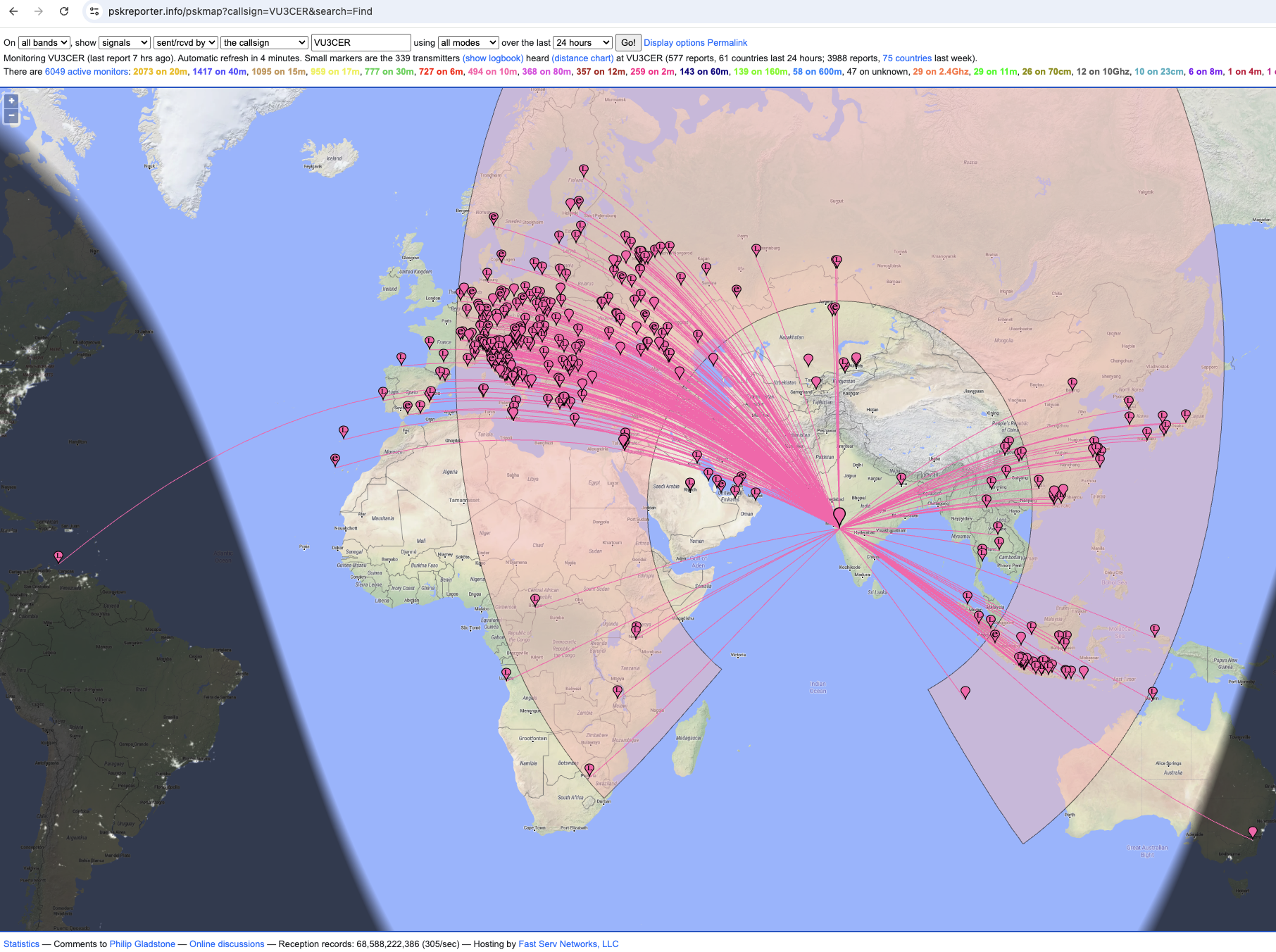
Not too bad given the prevailing conditions and the poor dry-noodle untuned antenna.
Tips
Note: Make a backup of the original microSD ASAP! Their quality is generally quite bad.
The original microSD card that came with the R36S clone was NOT mounting on Linux automatically.
Trying to mount it explicitly resulted in:
$ sudo kpartx -a /dev/sda
Warning: Disk has a valid GPT signature but invalid PMBR.
Assuming this is *not* a GPT disk anymore.
Quick-fix:
$ sudo kpartx -a -g /dev/sda
This forces GPT interpretation for this affected disk.
Note 2: Once WiFi and SSH are enabled:
ssh root@RK3326.local
Availability
https://www.electroniksindia.com/ is an OK'ish vendor for getting a R36S clone. The pricing on https://hgworld.in/ is pretty tempting but their customer service is pretty poor - I tend to stay away from them now, if possible.
YMMV, as always!
References
https://0x9900.com/100-countries-in-2-weeks-with-10-watt/ (Automated FT8)
https://www.kk5jy.net/ft8modem/ (Base for Automated FT8)
https://sourceforge.net/projects/wsjt-z/ (Automated FT8)