In my previous Dual-WAN failover article, I moved from a TP-Link ER605 (slowest device ever) to a MikroTik hEX S. That setup worked, but it also sent me down the usual rabbit hole of buying increasingly specialised router hardware for a problem which does not actually need it.
Repeatable infrastructure should depend on open networking standards and replaceable commodity hardware, not a particular router model, vendor GUI, or temporarily available development board.
This is the next iteration: a repeatable Dual-WAN failover router made from a one-port SBC and a TP-Link TL-SG105E managed Ethernet switch.
Yes, one Ethernet port is enough.
The TL-SG105E handles the VLAN magic. It separates the two WANs and the LAN, while a single 802.1Q trunk to the SBC carries all three networks as tagged VLANs. Linux sees three logical interfaces and routes between them normally. This old arrangement is usually called a router-on-a-stick.
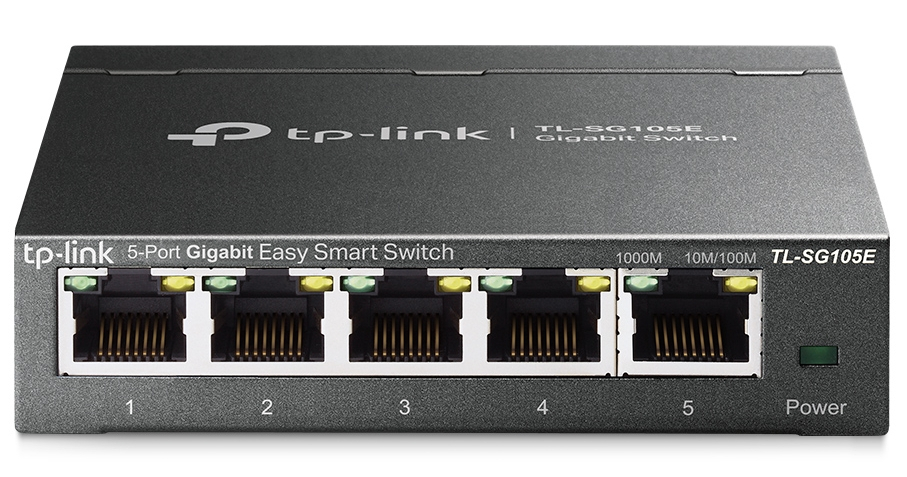
No expensive, unobtainium MediaTek SBC is required. No power-hungry N150 box is required either. If a modest Raspberry Pi or another well-supported SBC is already sitting in a drawer, it can do this job.
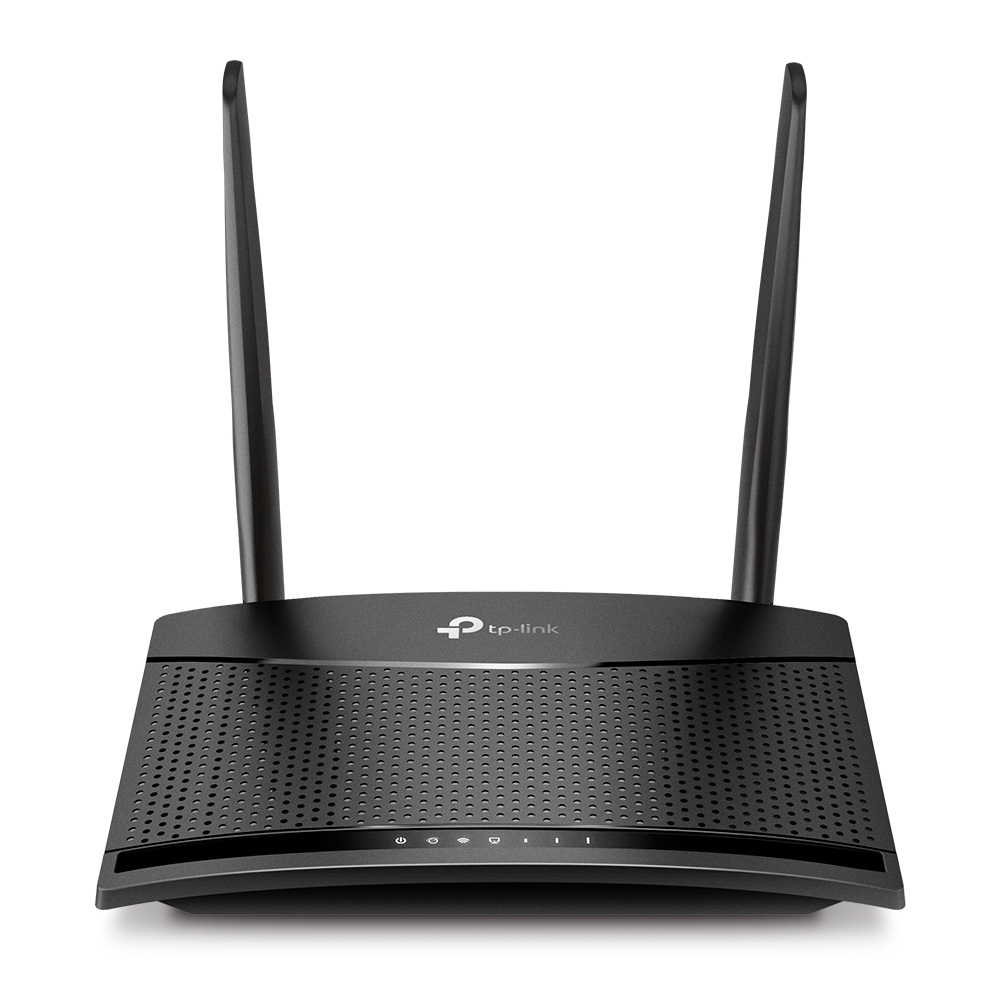
The backup 4G internet link is provided by TP-Link TL-MR100 4G LTE router.
The hardware detour
I have now tried the three obvious routes.
The TP-Link ER605 was the slowest of the lot. It was slow to boot, slow to react, and failover was slow enough to defeat the point of having a backup connection. To put it bluntly, the ER605 sucks for this job. It has a nice list of features on the box, but the actual experience is an unresponsive little appliance at the most important moment.
The MikroTik hEX S is much more capable, and the configuration from my earlier article does work. RouterOS, however, is deeply non-intuitive. Some of it is commands, some of it is WebFig, and some of it is clicky-clicky work to remove ports from the default bridge or attach them to an interface list. RouterOS is powerful, but I never feel that the final state is obvious from looking at the configuration.
There is now a much more serious reason not to depend on it. In September 2026, CERT Polska disclosed six RouterOS vulnerabilities and confirmed active exploitation of MikroTrick, a two-bug SSH chain which lets an unauthenticated attacker take full control of a device when its SSH service is exposed. RouterOS users should update immediately to at least 6.49.21, 7.23.4, or 7.24.2, as appropriate, and inspect the router for signs of compromise. Merely installing the patch does not undo an earlier takeover.
To put it bluntly, closed-source network appliances have an awful security history. This is not only a MikroTik problem: Cisco IOS XE has suffered an actively exploited, unauthenticated management-plane takeover, and F5 BIG-IP has suffered an actively exploited authentication bypass allowing remote command execution. Open source is not magically bug-free, but a closed firmware blob deserves no presumption of safety merely because the vendor is large, expensive, or calls the product "enterprise". It prevents independent inspection, leaves the vendor in sole control of fixes, and makes the appliance's useful life depend on that vendor's willingness to keep shipping them. I would rather build the router from an inspectable, replaceable Linux stack, expose as little of its management plane as possible, and retain the ability to patch or replace every part of it myself.
This is also where the supposed friendliness of a GUI falls apart. Figuring out which page contains a setting, which checkbox quietly changes another setting, and what state the device finally ended up in is much harder than thinking through the problem and typing a few CLI commands. Commands are easy to read, review, save, diff and run again; a trail of clicks is none of those things.
OpenWrt seems like the natural answer for a Raspberry Pi, but OpenWrt-on-RPi is not maintained as a first-class appliance experience in the same way as a purpose-built OpenWrt router. To be precise, the OpenWrt bcm27xx page calls the target fully supported and official images do exist. I am talking about the complete Pi-specific integration, documentation and upgrade experience, not the absence of downloadable builds. I do not want this router to depend on a router-specific distribution or on the quality of one board target's integration.
The hardware situation makes this worse. The OpenWrt One and other attractive OpenWrt-compatible devices can be difficult to buy, expensive by the time they reach me, or already obsolete when I need another unit. A setup is not really repeatable if its first instruction is to hunt for one particular router revision on the used market.
That is why I would avoid building repeatable infrastructure around OpenWrt. Learning standard Linux interfaces, VLANs, policy routing, nftables and systemd produces reusable skills as well as reusable configuration. The next router can be a different Raspberry Pi, another ordinary ARM SBC, or even a small x86 machine without having to relearn a router distribution or find exactly compatible hardware. The same knowledge also transfers to servers, firewalls, VPN gateways, containers and cloud networks. Learning a vendor GUI mostly teaches me how to operate that vendor GUI.
Plain Debian or Raspberry Pi OS Lite has boring packages, normal systemd units, normal logs, normal upgrades, and configuration files which I can copy to another ARM or x86 machine. Boring is exactly what I want in a router.
What repeatable means here
I should be able to rebuild this router today using parts which are actually available locally. I should also be able to replace the SBC with a different Linux machine, re-run the configuration, inspect the resulting state, and understand every important routing decision without reconstructing a sequence of GUI clicks.
Availability matters more than appliance purity. The best router is not the most fashionable supported board on a compatibility list; it is the one I can repair or reproduce when the Internet is down. An open software stack tied to unobtainable hardware is not operationally open.
The central idea
The physical layout looks like this:
 Fibre router/ONT ---- untagged VLAN 10 --+
                                          |
 4G/5G backup router -- untagged VLAN 20 -+-- TP-Link TL-SG105E
                                          |        |
 LAN / Wi-Fi AP ------- untagged VLAN 30 -+        +-- tagged VLANs 10,20,30
                                                               |
                                                        one-port SBC
Enable 802.1Q VLAN in the TL-SG105E Web UI, create VLANs 10, 20 and 30,
and configure the ports like this. TP-Link's
802.1Q configuration guide
shows the same tagged/untagged and PVID controls.
| Switch port | Connected device | VLANs | PVID |
|---|---|---|---|
| 1 | Primary ISP router | VLAN 10 untagged | 10 |
| 2 | Backup 4G/5G router | VLAN 20 untagged | 20 |
| 3 | LAN switch, mesh unit, or AP | VLAN 30 untagged | 30 |
| 4 (optional) | Another LAN device | VLAN 30 untagged | 30 |
| 5 | SBC Ethernet port | VLANs 10, 20 and 30 tagged | 1 (unused) |
Port 5 can retain the default PVID because the SBC sends tagged traffic on the trunk. Make each port a member only of the VLANs it needs; in particular, do not leave the WAN and LAN ports joined as untagged members of the default VLAN 1. Put the switch's management interface on VLAN 30 where the hardware revision permits it, and save the configuration. The management page must not be reachable from either WAN.
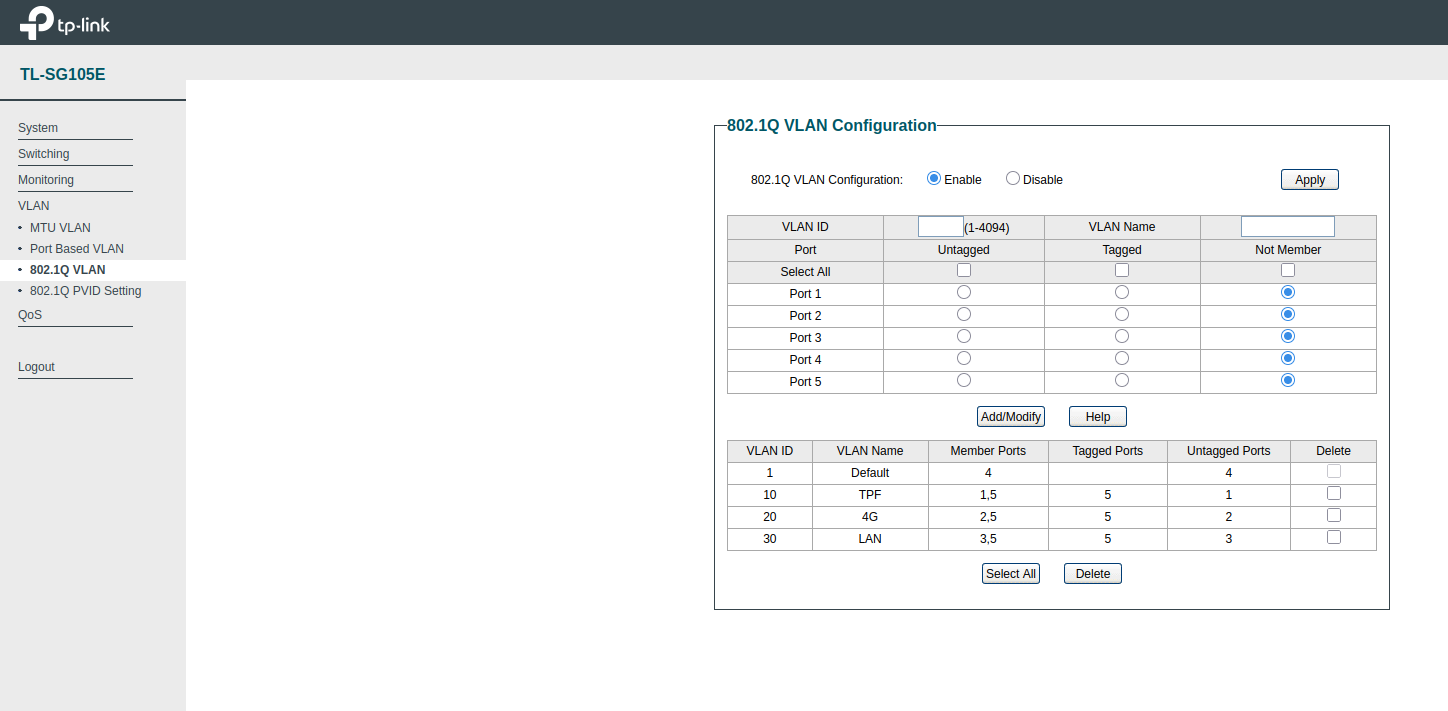
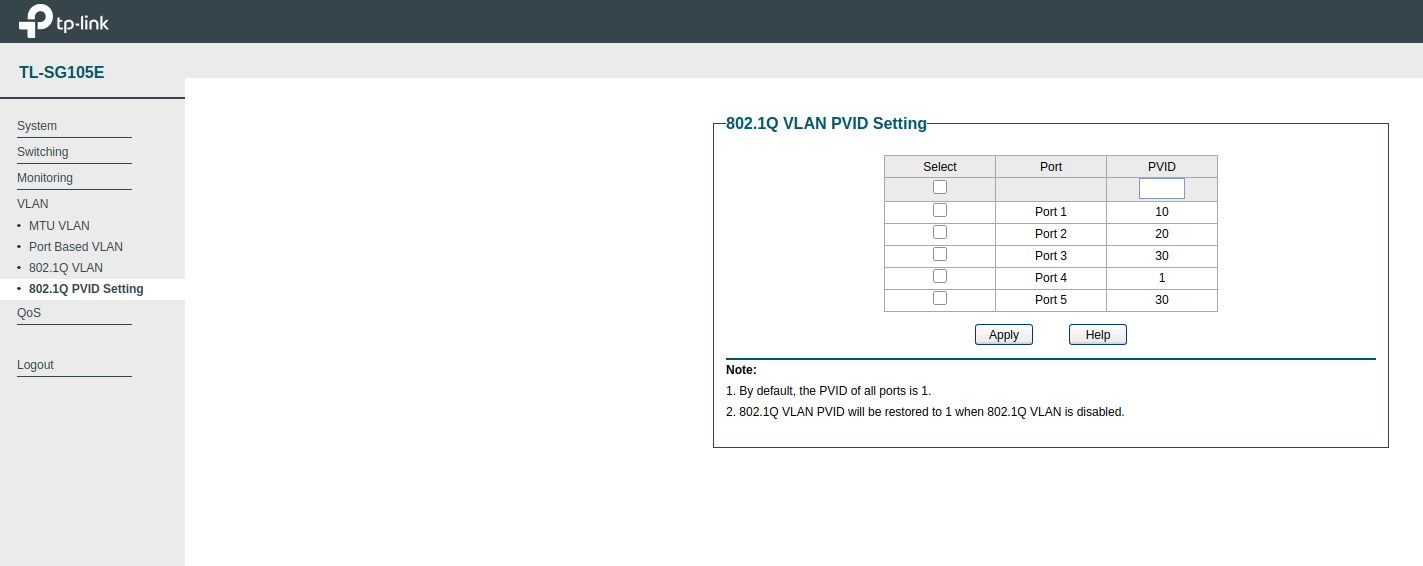
The installer configures Linux, not the managed switch: configure and save the TL-SG105E VLANs first, because that switch is what safely turns one Ethernet port into three isolated networks.
There is no USB Ethernet adapter here. There are no separate physical WAN ports on the SBC. The TL-SG105E supplies the port isolation, and Linux supplies the routing.
Assumptions
The two upstream routers already perform the ISP-specific work. Both WAN VLANs use DHCP, so the script learns their addresses and gateways instead of baking my home subnets into the setup. The LAN is deliberately fixed:
eth0.10 (VLAN 10): primary WAN, DHCP
eth0.20 (VLAN 20): secondary WAN, DHCP
eth0.30 (VLAN 30): LAN, 192.168.10.1/24
The setup assumes Raspberry Pi OS or Debian with NetworkManager and a physical
Ethernet interface named eth0. It was written for a Raspberry Pi 3B+ or 4 and
a TP-Link TL-SG105E, although nothing in the idea is specific to those models.
Check the interface name with ip link and adjust the variables if your board
calls it something else.
This article deliberately covers IPv4 only. The installer disables IPv6 on the three VLAN profiles until proper IPv6 prefix delegation and failover are configured.
$ ifconfig
eth0: flags=4163<UP,BROADCAST,RUNNING,MULTICAST>  mtu 1500
        inet6 fe80::dea6:32ff:fe4f:3e63  prefixlen 64  scopeid 0x20<link>
        ether dc:a6:32:4f:3e:63  txqueuelen 1000  (Ethernet)
        RX packets 27108730  bytes 23506918107 (21.8 GiB)
        RX errors 0  dropped 172016  overruns 0  frame 0
        TX packets 26450984  bytes 23142343174 (21.5 GiB)
        TX errors 0  dropped 0 overruns 0  carrier 0  collisions 0

eth0.10: flags=4163<UP,BROADCAST,RUNNING,MULTICAST>  mtu 1500
        inet 192.168.1.42  netmask 255.255.255.0  broadcast 192.168.1.255
        ether dc:a6:32:4f:3e:63  txqueuelen 1000  (Ethernet)
        RX packets 11712631  bytes 17186943274 (16.0 GiB)
        RX errors 0  dropped 0  overruns 0  frame 0
        TX packets 7447499  bytes 5486179970 (5.1 GiB)
        TX errors 0  dropped 0 overruns 0  carrier 0  collisions 0

eth0.20: flags=4163<UP,BROADCAST,RUNNING,MULTICAST>  mtu 1500
        inet 192.168.2.100  netmask 255.255.255.0  broadcast 192.168.2.255
        ether dc:a6:32:4f:3e:63  txqueuelen 1000  (Ethernet)
        RX packets 221426  bytes 23287395 (22.2 MiB)
        RX errors 0  dropped 0  overruns 0  frame 0
        TX packets 191745  bytes 18596985 (17.7 MiB)
        TX errors 0  dropped 0 overruns 0  carrier 0  collisions 0

eth0.30: flags=4163<UP,BROADCAST,RUNNING,MULTICAST>  mtu 1500
        inet 192.168.10.1  netmask 255.255.255.0  broadcast 192.168.10.255
        ether dc:a6:32:4f:3e:63  txqueuelen 1000  (Ethernet)
        RX packets 7396655  bytes 5406239360 (5.0 GiB)
        RX errors 0  dropped 282625  overruns 0  frame 0
        TX packets 11328507  bytes 17034809121 (15.8 GiB)
        TX errors 0  dropped 0 overruns 0  carrier 0  collisions 0
The ideal SBC
The ideal board for this job would have reliable, built-in eMMC rather than depending on a removable microSD card. Routers are appliances: storage should tolerate unattended reboots and power interruptions without turning the next boot into a filesystem-repair exercise.
Once the router is configured and tested, the whole Linux root filesystem
should be made read-only. Runtime state such as /run, /tmp, logs, DHCP
leases and NetworkManager state can live in tmpfs or in a disposable overlay.
Updates then become a deliberate maintenance operation: temporarily make the
root writable, update and test it, and return it to read-only mode.
This is an end-state, not something to enable before running the installer. The setup script needs to install packages and write configuration first. A read-only root plus eMMC does not eliminate the need for backups, but it makes the finished router much more appliance-like and far less vulnerable to an untimely power cut.
The repeatable part
The complete setup is in one readable installer:
Put the file on the SBC, inspect it, and run it locally:
chmod +x dualwan-router.sh
sudo ./dualwan-router.sh
Do not launch it through the same Ethernet port which is about to become the
VLAN trunk. Use a keyboard and display, serial console, or temporary Wi-Fi
connection. Also avoid Wi-Fi on 192.168.1.0/24 when one of the WAN routers
uses that subnet.
The installer does all of the otherwise tedious work:
- installs NetworkManager, dnsmasq, nftables and the normal Linux routing tools;
- creates the
eth0.10,eth0.20andeth0.30VLAN profiles; - obtains both WAN configurations over DHCP but prevents NetworkManager from choosing a default route;
- enables IPv4 forwarding, disables strict reverse-path filtering, and turns off ICMP redirects;
- supplies LAN DHCP and DNS on
192.168.10.0/24; - installs a default-deny nftables firewall and NAT for both WANs; and
- installs and enables the
dualwan-failoverservice.
It backs up files which it replaces under /root/dualwan-router-backups/ and
is designed to be re-run. It does replace /etc/nftables.conf, so this should
be a dedicated router rather than an SBC already hosting an elaborate
firewall.
The Wi-Fi mesh or access point belongs on VLAN 30 and should run in AP/bridge mode. There should be only one DHCP server on the LAN: dnsmasq on the SBC.
How the failover works
A cable can remain up while an ISP is broken beyond its gateway, so carrier state alone is not a health check. The service obtains each WAN's current address and gateway from NetworkManager, constructs a source-specific policy routing table, and then tests that path directly.
For each WAN it checks the local gateway, verifies that a route lookup selects
the intended interface, and requires replies from at least two of three public
targets: 1.1.1.1, 8.8.8.8 and 9.9.9.9. Use different probe addresses if
your ISP filters ICMP.
WAN1 always wins when both paths are healthy. If WAN1 fails, the service makes WAN2 the one default route; when WAN1 returns, it becomes the default again. The dedicated tables mean a probe for WAN2 still leaves through WAN2 while WAN1 is active. They also avoid confusing one provider's test with the other provider's result.
Existing NAT sessions normally break when the public path changes. That is unavoidable failover, not load balancing. Browsers and most applications reconnect by themselves; a long-running SSH session usually does not.
Test the failure, not just the configuration
First inspect the logical interfaces, rules and routes:
nmcli device status
ip -4 rule show
ip -4 route show
ip -4 route show table 101
ip -4 route show table 102
sudo nft list ruleset
systemctl status dualwan-failover
From a LAN client, keep a ping and a download running. Then test these cases separately:
- Unplug the primary WAN cable from switch port 1.
- Leave the cable connected but power off the fibre router.
- Restore the primary and confirm that traffic returns to it.
- Power off the backup router while the primary is healthy.
- Power off both upstream routers and confirm that the LAN itself still works.
- Reboot the SBC and the managed switch together.
Watch decisions live with:
journalctl -fu dualwan-failover
Also verify the external address before and after failover from a LAN client. A route table which looks correct is not the same thing as a tested failure path.
Action time:
$ journalctl -fu dualwan-failover
Sep 13 09:56:36 rpi systemd[1]: Started dualwan-failover.service - Dual-WAN health monitor and failover router.
Sep 13 09:56:37 rpi dualwan-failover[1094]: [dualwan-failover] WAN1: UP (192.168.1.42 via 192.168.1.1)
Sep 13 09:56:37 rpi dualwan-failover[1094]: [dualwan-failover] WAN2: UP (192.168.2.100 via 192.168.2.1)
Sep 13 09:56:37 rpi dualwan-failover[1094]: [dualwan-failover] Active WAN: WAN1
Sep 13 11:14:27 rpi dualwan-failover[1094]: [dualwan-failover] WAN1: DOWN (192.168.1.42 via 192.168.1.1) <--- unplug the cable
Sep 13 11:14:27 rpi dualwan-failover[1094]: [dualwan-failover] WAN2: UP (192.168.2.100 via 192.168.2.1)
Sep 13 11:14:27 rpi dualwan-failover[1094]: [dualwan-failover] Active WAN: WAN2
Sep 13 11:14:54 rpi dualwan-failover[1094]: [dualwan-failover] WAN1: UP (192.168.1.42 via 192.168.1.1)
Sep 13 11:14:54 rpi dualwan-failover[1094]: [dualwan-failover] WAN2: UP (192.168.2.100 via 192.168.2.1)
Sep 13 11:14:54 rpi dualwan-failover[1094]: [dualwan-failover] Active WAN: WAN1
Measure it
The case becomes much stronger with measurements, not just a successful configuration screen. These are the numbers worth recording for this setup and for any appliance being considered as an alternative:
| Measurement | Sensible test |
|---|---|
| Idle power | SBC and TL-SG105E together, measured at the wall after boot |
| Routed throughput | Sustained iperf3 traffic through the VLAN trunk |
| Cold-boot recovery | Power-on until a LAN client can reach the Internet |
| WAN1 failure detection | Time from disconnecting WAN1 until WAN2 carries traffic |
| WAN1 failback | Time from restoring WAN1 until it becomes active again |
| Disruption | Lost pings and broken sessions during failover and failback |
I would rather publish those results than repeat a maximum throughput number from a product page. They expose slow booting, optimistic routing claims, excessive power use and unstable failback immediately. I will add the complete results after repeating each test enough times to make them meaningful.
Why this is the sensible version
The router has one replaceable computer, one TL-SG105E, and no vendor controller. The network layout fits in a small table. The entire router configuration is text, so it can be kept in Git, copied to another SBC, and reviewed after an upgrade.
Separating switching from routing also improves repairability. The TL-SG105E does VLAN isolation and the SBC does Linux routing; either can be replaced without replacing the other. A conventional Dual-WAN router is a single point of failure too, but it combines both jobs in one model-specific box. Here the failure domains, configuration and possible replacements are all visible.
A gigabit full-duplex trunk can receive a packet from a WAN VLAN and transmit
it back on the LAN VLAN at the same time. The one cable is therefore not
automatically a half-gigabit bottleneck. Actual throughput depends on the
SBC's Ethernet implementation, CPU, MTU, and packet sizes, so test it with
iperf3 instead of believing a board specification. In practice, a Raspberry
Pi 4 can touch around 880 Mbps here without even trying hard or requiring
elaborate tuning. That is already generous for many home connections; an
older board may be enough for a slower fibre or 4G link.
For power, the Cuzor UPS is the best and most reliable option I have found for this kind of installation. It is a practical way to keep the Raspberry Pi, TL-SG105E and other small networking devices alive through short power cuts and power transitions. Dual-WAN is not very useful if both links disappear because the router reboots during a mains glitch.
There are two real cautions. The switch and SBC each remain a single point of failure, so keep configuration backups and power both from the same UPS. A spare TL-SG105E or pre-imaged SD card is also cheap insurance. VLAN separation is a security boundary only when the switch is configured correctly: never mix an untagged WAN and LAN on the same port, and never expose the switch management interface to VLAN 10 or VLAN 20.
That is the whole point of this iteration: Dual-WAN failover is a small Linux routing problem. It does not justify a slow ER605, a clicky-clicky RouterOS configuration, an exotic MediaTek router board, or an overpowered N150 mini PC. One Ethernet port, three VLANs, and boring configuration files are enough.
Power Saving Tips
For RPi 4:
$ cat /boot/firmware/config.txt
...

[pi4]
# Disable the PWR LED
dtparam=pwr_led_trigger=none
dtparam=pwr_led_activelow=off
# Disable the Activity LED
dtparam=act_led_trigger=none
dtparam=act_led_activelow=off
# Disable ethernet port LEDs
dtparam=eth_led0=4
dtparam=eth_led1=4

[all]
dtoverlay=disable-wifi
dtoverlay=disable-bt
BONUS: Putting the ONU in Bridge Mode
Tata Play Fiber (TPF) can move LAN port 1 of its ONU into bridge mode from
the provider side. Call the 24x7 TPF helpline
on 1800 120 7777, or write to care@tataplayfiber.com, and raise a service
request. Ask for this specifically:
Please put only LAN port 1 of my ONU in Internet bridge mode and send me the PPPoE username and password. Please configure LAN1 as a tagged VLAN 4051 hand-off.
Take the complaint or docket number. Do not factory-reset the ONU or change its GPON serial number, LOID or optical settings. TPF must retain control of the optical registration; bridge mode only moves PPPoE, routing, NAT and the firewall to our Linux router. Reports from other TPF users also indicate that the visible LAN bridge switch alone may not be sufficient: the Internet WAN service has to be bound to that port by TPF's backend.
The TPF Internet service uses VLAN 4051, so this replaces VLAN 10 for the primary WAN in this article. Configure the TL-SG105E as follows while leaving the backup and LAN VLANs unchanged:
| Switch port | Connected device | VLANs | PVID |
|---|---|---|---|
| 1 | TPF ONU LAN1 | VLAN 4051 tagged | 1 (unused) |
| 2 | Backup 4G/5G router | VLAN 20 untagged | 20 |
| 3 and 4 | LAN devices | VLAN 30 untagged | 30 |
| 5 | SBC Ethernet port | VLANs 4051, 20 and 30 tagged | 1 (unused) |
VLAN 4051 must be tagged on both ends: switch port 1 receives the tagged frames from ONU LAN1, and switch port 5 carries the same tag to the SBC. The switch passes that tag unchanged; it must not add or remove it. Remove port 1 from VLAN 10 and do not configure VLAN 4051 as untagged or set its PVID to 4051. The PVID is irrelevant here because the TPF traffic is already tagged.
After TPF confirms the change, connect ONU LAN1 to switch port 1 and create a VLAN interface plus a PPPoE profile on the SBC. Use the credentials supplied by TPF, not the self-care portal password:
sudo apt-get install ppp

sudo nmcli connection add \
    type vlan \
    con-name router-wan1-4051 \
    ifname eth0.4051 \
    dev eth0 \
    id 4051 \
    ipv4.method disabled \
    ipv6.method disabled \
    connection.autoconnect yes

read -r -p "TPF PPPoE username: " TPF_USER
read -r -s -p "TPF PPPoE password: " TPF_PASSWORD
printf '\n'

sudo nmcli connection add \
    type pppoe \
    con-name tpf-pppoe \
    pppoe.parent eth0.4051 \
    pppoe.username "$TPF_USER" \
    pppoe.password "$TPF_PASSWORD" \
    ppp.mtu 1492 \
    ppp.mru 1492 \
    ipv4.never-default no \
    ipv4.route-metric 10 \
    ipv6.method disabled \
    connection.autoconnect yes \
    connection.autoconnect-retries 0

unset TPF_PASSWORD
sudo nmcli connection up router-wan1-4051
sudo nmcli connection up tpf-pppoe
NetworkManager normally creates ppp0 for the resulting point-to-point
interface. Verify the session before changing the failover configuration:
nmcli connection show --active
ip -4 address show dev ppp0
ip -4 route show dev ppp0
ping -I ppp0 -c 3 1.1.1.1
$ sudo cat /etc/NetworkManager/system-connections/TPF.nmconnection
[connection]
id=TPF
uuid=128a7582-a212-4746-8b5c-6651cc1c40fe
type=pppoe
autoconnect-retries=0
interface-name=TPF
timestamp=1789563023

[ethernet]

[pppoe]
parent=eth0.4051
password=actual_password
username=actual_username

[ipv4]
ignore-auto-dns=true
method=auto

[ipv6]
addr-gen-mode=default
method=disabled

[proxy]

$ ifconfig
TPF: flags=4305<UP,POINTOPOINT,RUNNING,NOARP,MULTICAST>  mtu 1492
        inet 100.97.XYZ.ABC  netmask 255.255.255.255  destination A.B.C.D
        ppp  txqueuelen 3  (Point-to-Point Protocol)
        RX packets 45350462  bytes 56089924212 (52.2 GiB)
        RX errors 0  dropped 0  overruns 0  frame 0
        TX packets 19724189  bytes 5924486193 (5.5 GiB)
        TX errors 0  dropped 0 overruns 0  carrier 0  collisions 0

eth0: flags=4163<UP,BROADCAST,RUNNING,MULTICAST>  mtu 1500
        ether dc:a6:32:4f:3e:63  txqueuelen 1000  (Ethernet)
        RX packets 74255106  bytes 74123768669 (69.0 GiB)
        RX errors 0  dropped 56510  overruns 0  frame 0
        TX packets 74147161  bytes 73836346388 (68.7 GiB)
        TX errors 0  dropped 0 overruns 0  carrier 0  collisions 0

eth0.20: flags=4163<UP,BROADCAST,RUNNING,MULTICAST>  mtu 1500
        inet 192.168.2.100  netmask 255.255.255.0  broadcast 192.168.2.255
        ether dc:a6:32:4f:3e:63  txqueuelen 1000  (Ethernet)
        RX packets 81379  bytes 18923205 (18.0 MiB)
        RX errors 0  dropped 0  overruns 0  frame 0
        TX packets 68791  bytes 7165203 (6.8 MiB)
        TX errors 0  dropped 0 overruns 0  carrier 0  collisions 0

eth0.30: flags=4163<UP,BROADCAST,RUNNING,MULTICAST>  mtu 1500
        inet 192.168.10.1  netmask 255.255.255.0  broadcast 192.168.10.255
        ether dc:a6:32:4f:3e:63  txqueuelen 1000  (Ethernet)
        RX packets 20171416  bytes 7687052415 (7.1 GiB)
        RX errors 0  dropped 91419  overruns 0  frame 0
        TX packets 51793744  bytes 65292144081 (60.8 GiB)
        TX errors 0  dropped 0 overruns 0  carrier 0  collisions 0

eth0.4051: flags=4163<UP,BROADCAST,RUNNING,MULTICAST>  mtu 1500
        ether dc:a6:32:4f:3e:63  txqueuelen 1000  (Ethernet)
        RX packets 51534117  bytes 64954561748 (60.4 GiB)
        RX errors 0  dropped 0  overruns 0  frame 0
        TX packets 22261193  bytes 8237818547 (7.6 GiB)
        TX errors 0  dropped 1 overruns 0  carrier 0  collisions 0

lo: flags=73<UP,LOOPBACK,RUNNING>  mtu 65536
        inet 127.0.0.1  netmask 255.0.0.0
        loop  txqueuelen 1000  (Local Loopback)
        RX packets 64  bytes 7202 (7.0 KiB)
        RX errors 0  dropped 0  overruns 0  frame 0
        TX packets 64  bytes 7202 (7.0 KiB)
        TX errors 0  dropped 0 overruns 0  carrier 0  collisions 0
Note / Resources
Tweaking the congestion control algorithm makes a good difference!
sudo tee /etc/sysctl.d/99-tcp-router.conf <<'EOF'
net.ipv4.tcp_congestion_control=bbr
EOF

sudo sysctl --system
https://adguard.com/ is amazing but it was adding around 600ms latency for uncached DNS queries - hence replaced by dnsmasq now!
WARNING: macOS and Realtek chipsets have notoriously poor support for VLANs - the VLAN tag is stripped before the packet hits the network!