Why This Post Exists
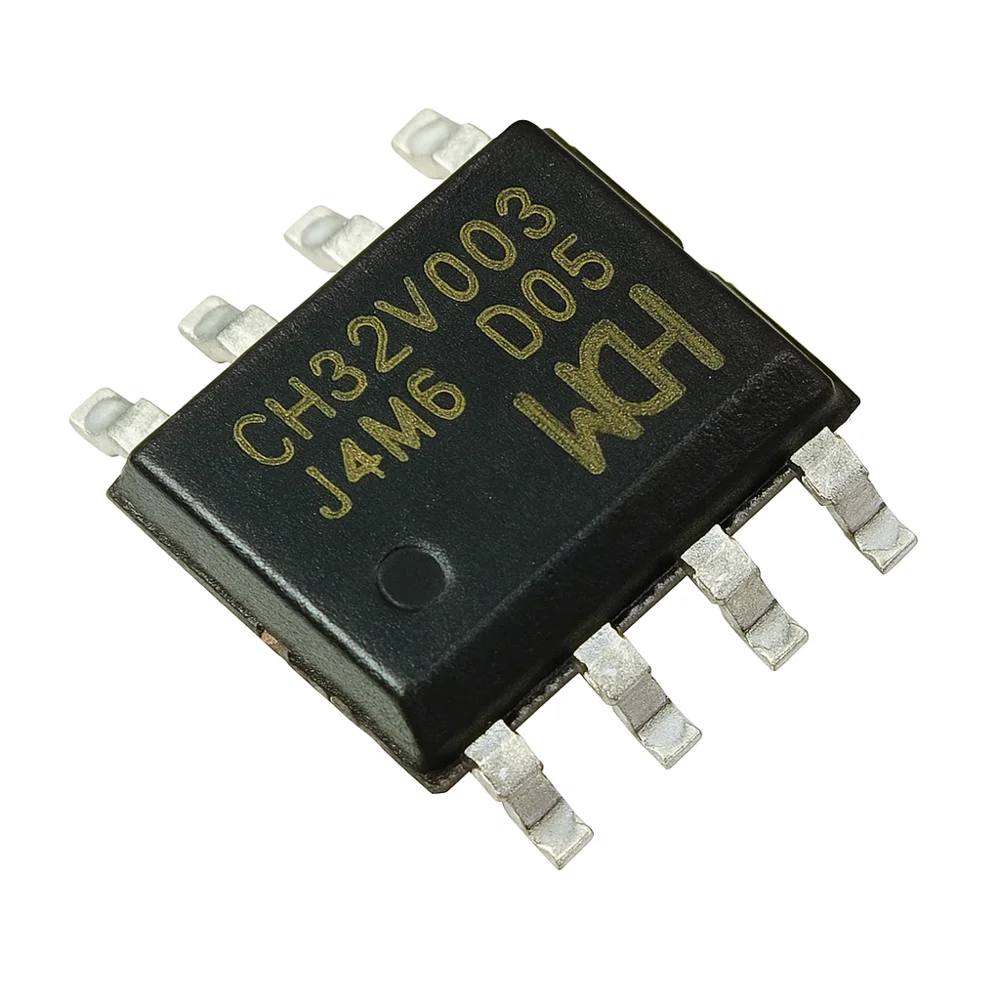
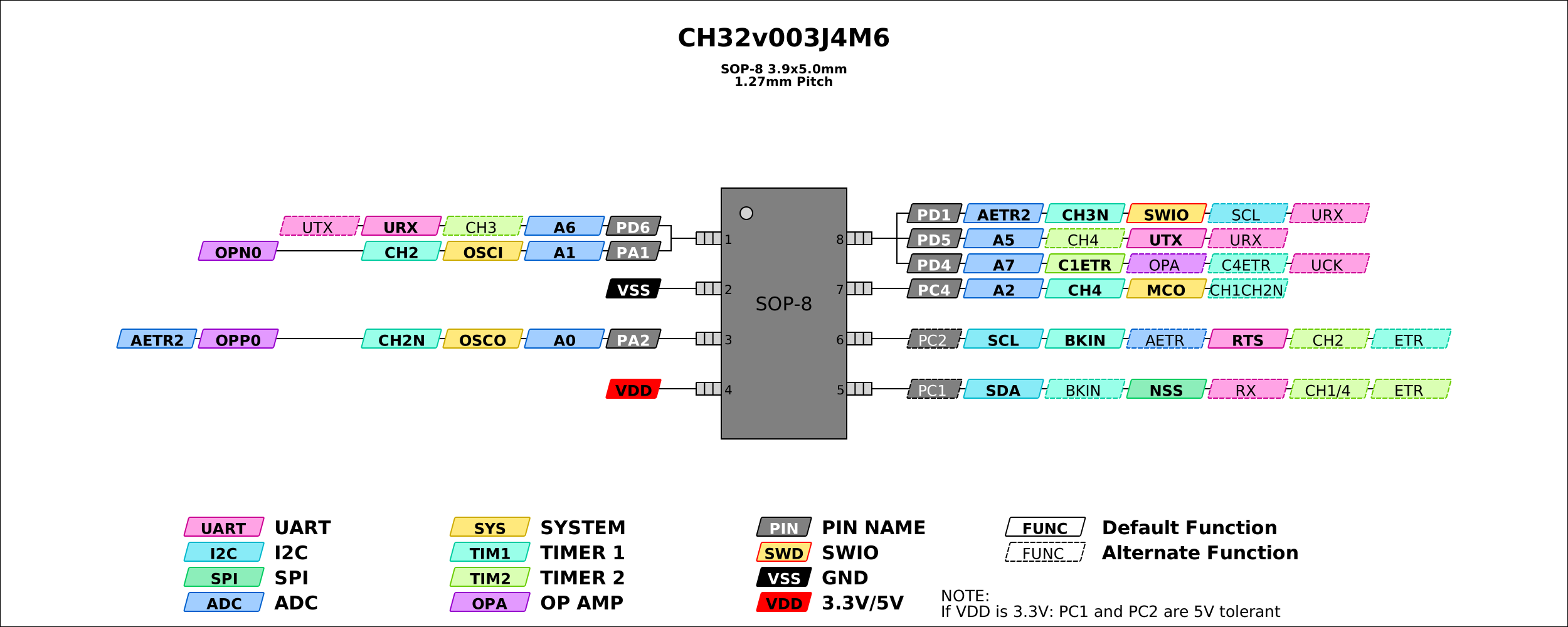
I wanted to learn practical voltage fault injection on low-cost MCUs like WCH CH32V003 and Puya PY32F003.
What is Voltage Glitching?
Voltage glitching is a form of hardware fault injection where very short disturbances are introduced into a device's power supply. These disturbances can cause the CPU to skip instructions, misread memory, or bypass security checks. Researchers commonly use voltage glitching to study the robustness of microcontrollers and secure boot implementations.
The usual recommendation for conducting these attacks is the ChipWhisperer,
and yes, it is excellent. But in my reality, it is also expensive (close to 1L
INR) and often hard to source (sometimes effectively unobtanium in my region).
Pico Glitcher V2 (now V3) was the lifesaver.
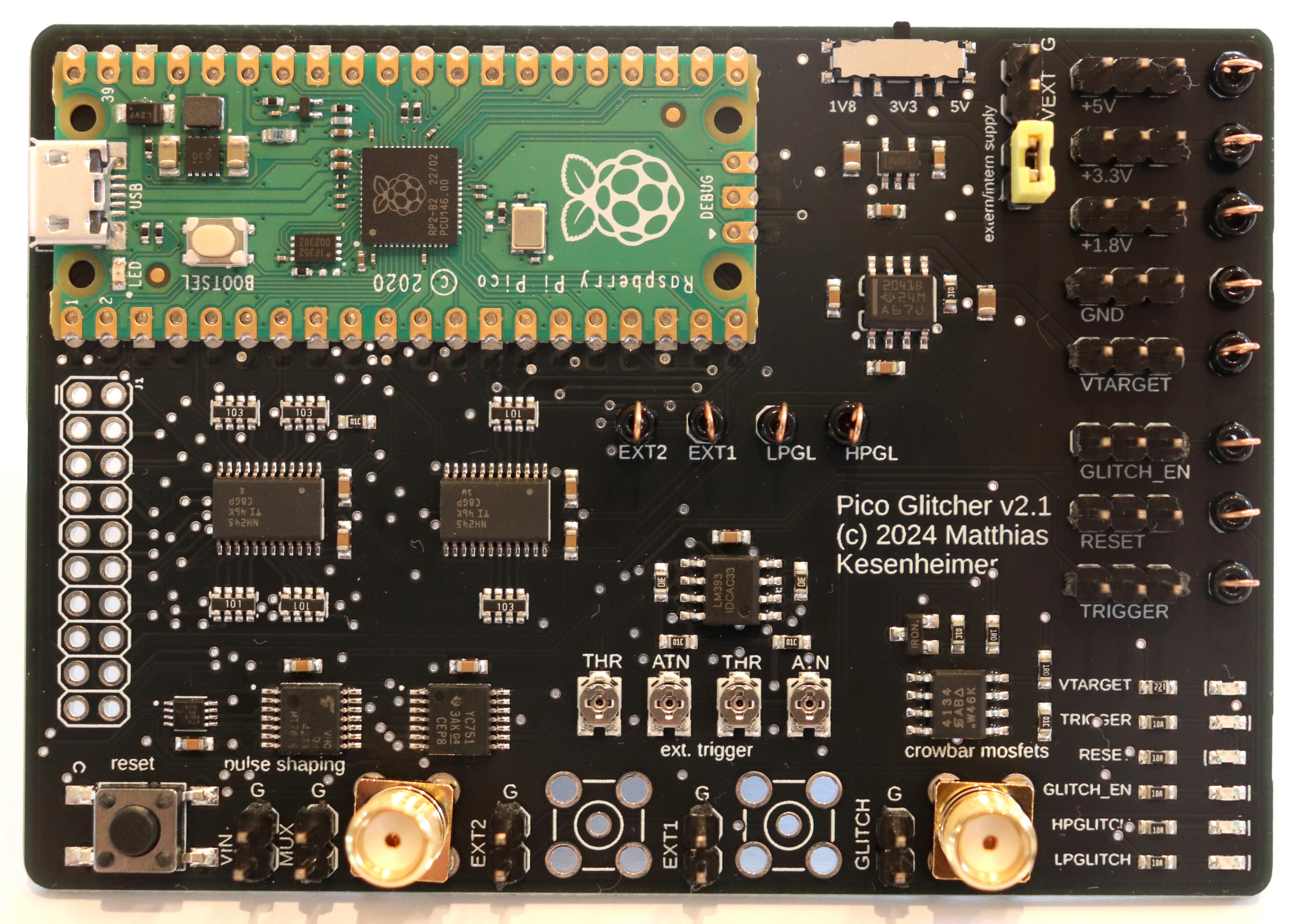
Affordable, available, hackable, and excellent enough to do real work.
Scope and Ethics
This work is done only on my own hardware, my own firmware, and my own test boards.
This experiment focuses on the WCH CH32V003 RISC-V microcontroller and the Puya PY32 ARM Cortex-M0+ microcontroller, both extremely inexpensive chips that are widely available.
Goal: Understand attack surfaces and improve embedded security.
Setup
My baseline lab stack:
Pico Glitcherfor fault injection timing and pulse generation- Targets: Bare WCH CH32V003 and Puya PY32 SOP-8 chips for easy glitching!
- GPIO trigger from firmware checkpoint
I started with a simple, reproducible target firmware:
- Boot
- Password check
- Branch to
successorfail
#include <stdint.h>
#include "ch32fun.h"

/*
 * Deliberately vulnerable CH32V003 voltage-glitch target.
 *
 * PC1: trigger
 * PC2: success
 * PC4: normal failure
 *
 * Marker protocol:
 *   PC2=1, PC4=0: vulnerable check returned success
 *   PC2=0, PC4=1: vulnerable check returned failure
 *   PC2=1, PC4=1: the target has just booted or rebooted
 *
 * The dual-high boot marker lets glitch_sweep_ch32_gpio.py distinguish a
 * brown-out reset from the failure marker emitted by the next execution.
 */

#define PIN_TRIGGER PC1
#define PIN_SUCCESS PC2
#define PIN_FAIL    PC4

/*
 * Build with -DDEMO_SUPPLIED_VALUE=0xA55A1234u for a positive-control image.
 * That image must pulse PIN_SUCCESS without requiring a successful glitch.
 */
#ifndef DEMO_SUPPLIED_VALUE
#define DEMO_SUPPLIED_VALUE 0xDEADBEEFu
#endif

/*
 * A fixed assembly NOP sled gives the glitcher several microseconds to react
 * to the trigger. At 48 MHz, 256 NOPs take about 5.33 us. Unlike a C delay
 * loop, the timing does not depend on optimization or loop overhead.
 */
#ifndef DEMO_PRE_BRANCH_NOPS
#define DEMO_PRE_BRANCH_NOPS 256
#endif

#define STRINGIFY_INNER(value) #value
#define STRINGIFY(value) STRINGIFY_INNER(value)

/*
 * Volatile values prevent GCC/LTO from resolving the comparison
 * during compilation.
 */
static volatile uint32_t supplied_value = DEMO_SUPPLIED_VALUE;
static volatile uint32_t expected_value = 0xA55A1234u;

/*
 * Normal execution:
 *
 *     supplied != expected
 *     bne jumps to fail
 *     return 0
 *
 * Successful branch-skip glitch ('control-flow fault consistent with branch skipping' more precisely):
 *
 *     bne is skipped
 *     return 1
 */
__attribute__((naked, noinline, used))
static int vulnerable_check(uint32_t supplied, uint32_t expected)
{
    __asm__ volatile(
        "bne a0, a1, 1f\n"  /* The single glitch target */
        "li  a0, 1\n"       /* Branch skipped: success */
        "ret\n"

        "1:\n"
        "li  a0, 0\n"       /* Normal path: failure */
        "ret\n"
    );
}

static void gpio_init(void)
{
    funGpioInitAll();

    funPinMode(PIN_TRIGGER, GPIO_Speed_10MHz | GPIO_CNF_OUT_PP);
    funPinMode(PIN_SUCCESS, GPIO_Speed_10MHz | GPIO_CNF_OUT_PP);
    funPinMode(PIN_FAIL,    GPIO_Speed_10MHz | GPIO_CNF_OUT_PP);

    funDigitalWrite(PIN_TRIGGER, FUN_LOW);
    funDigitalWrite(PIN_SUCCESS, FUN_LOW);
    funDigitalWrite(PIN_FAIL,    FUN_LOW);
}

static void signal_boot(void)
{
    /* Dual-high is reserved for a boot/reset indication. */
    funDigitalWrite(PIN_SUCCESS, FUN_HIGH);
    funDigitalWrite(PIN_FAIL, FUN_HIGH);
    Delay_Ms(20);
    funDigitalWrite(PIN_SUCCESS, FUN_LOW);
    funDigitalWrite(PIN_FAIL, FUN_LOW);
    Delay_Ms(5);
}

int main(void)
{
    SystemInit();
    gpio_init();
    signal_boot();

    while (1) {
        funDigitalWrite(PIN_SUCCESS, FUN_LOW);
        funDigitalWrite(PIN_FAIL, FUN_LOW);

        /* Trigger before a deterministic pre-branch timing window. */
        funDigitalWrite(PIN_TRIGGER, FUN_HIGH);

        __asm__ volatile(
            ".rept " STRINGIFY(DEMO_PRE_BRANCH_NOPS) "\n"
            "nop\n"
            ".endr\n"
            ::: "memory"
        );

        int ok = vulnerable_check(supplied_value, expected_value);

        funDigitalWrite(PIN_TRIGGER, FUN_LOW);

        if (ok) {
            funDigitalWrite(PIN_SUCCESS, FUN_HIGH);
            Delay_Ms(20);
            funDigitalWrite(PIN_SUCCESS, FUN_LOW);
        } else {
            funDigitalWrite(PIN_FAIL, FUN_HIGH);
            Delay_Ms(20);
            funDigitalWrite(PIN_FAIL, FUN_LOW);
        }

        Delay_Ms(20);
    }
}
$ git diff
diff --git a/examples/blink/Makefile b/examples/blink/Makefile
index 7107cf3..ecb622e 100644
--- a/examples/blink/Makefile
+++ b/examples/blink/Makefile
@@ -3,9 +3,10 @@ all : flash
 TARGET:=blink

 TARGET_MCU?=CH32V003
+# Bare CH32V003 without external crystal: force internal HSI clock source.
+EXTRA_CFLAGS += -DFUNCONF_USE_HSI=1 -DFUNCONF_USE_HSE=0 -DFUNCONF_HSE_BYPASS=0
...

$ pwd
~/repos/ch32fun/examples/blink
This made it easy to detect whether a glitch changed control flow.
Methodology (What Actually Matters)
Voltage glitching is mostly about discipline, not magic.
I systematically swept three core parameters:
- Glitch offset (when to inject)
- Glitch width (how long)
- Glitch amplitude/depth (how hard)
For each parameter set, I ran repeated trials and labeled outcomes:
- Normal boot
- Reset/hang
- Faulted behavior (interesting)
- False positive
Then I plotted success-rate heatmaps. Without data, glitching turns into superstition.
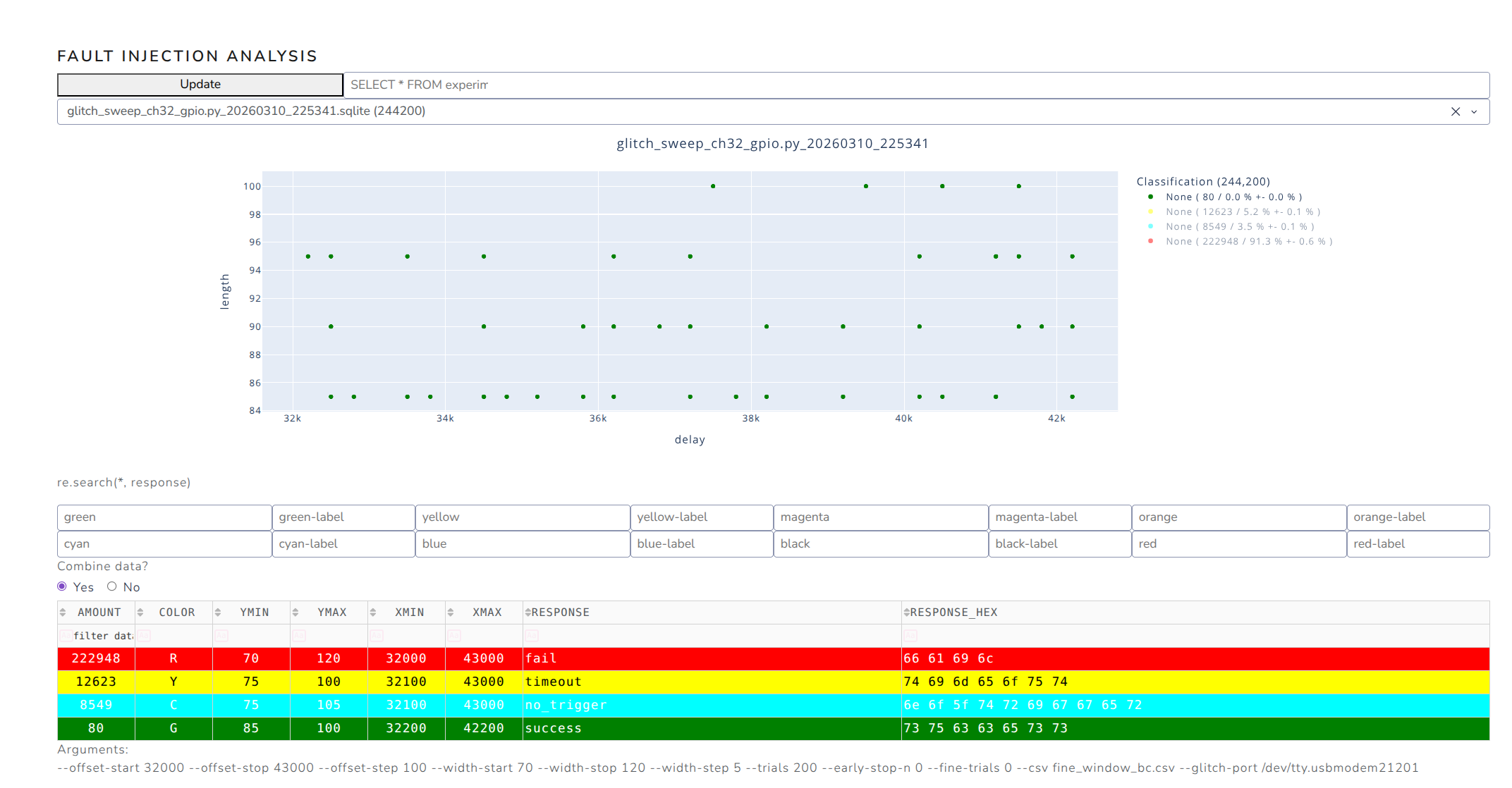
Success!
To the best of my knowledge, this may be the first publicly documented glitching experiment targeting the CH32V003 family.
$ python3 glitch_sweep_ch32_gpio.py
...
[+] Initializing database (resume=False)... Done. (Database: glitch_sweep_ch32_gpio.py_20260731_094512.sqlite [Fast Mode])
[+] Phase 1 (coarse): 1 coordinates, 1000 trials each (early-stop after 0 successes)
[+] Opening CSV for results: ch32v003_demo_confirm_5580_15.csv
[*] [1/1] offset=  5580ns width=  15ns (1000 trials)
[.] 36/1000 (  3.60%) rate=  17.0/s eta=56s ok=1 fail=32 reset=0 timeout=1 noTrig=2 commErr=0
[.] 87/1000 (  8.70%) rate=  21.1/s eta=43s ok=1 fail=83 reset=0 timeout=1 noTrig=2 commErr=0
[.] 128/1000 ( 12.80%) rate=  20.8/s eta=41s ok=2 fail=120 reset=0 timeout=2 noTrig=4 commErr=0
[.] 172/1000 ( 17.20%) rate=  21.1/s eta=39s ok=3 fail=163 reset=0 timeout=2 noTrig=4 commErr=0
[.] 200/1000 ( 20.00%) rate=  20.2/s eta=39s ok=3 fail=188 reset=0 timeout=3 noTrig=6 commErr=0
[.] 229/1000 ( 22.90%) rate=  19.2/s eta=40s ok=3 fail=212 reset=0 timeout=5 noTrig=9 commErr=0
[.] 263/1000 ( 26.30%) rate=  18.9/s eta=39s ok=3 fail=243 reset=0 timeout=6 noTrig=11 commErr=0
[.] 287/1000 ( 28.70%) rate=  18.0/s eta=39s ok=4 fail=262 reset=0 timeout=7 noTrig=14 commErr=0
[.] 336/1000 ( 33.60%) rate=  18.7/s eta=35s ok=5 fail=310 reset=0 timeout=7 noTrig=14 commErr=0
[.] 366/1000 ( 36.60%) rate=  18.3/s eta=34s ok=6 fail=334 reset=0 timeout=9 noTrig=17 commErr=0
[.] 400/1000 ( 40.00%) rate=  18.4/s eta=32s ok=6 fail=367 reset=0 timeout=9 noTrig=18 commErr=0
[.] 419/1000 ( 41.90%) rate=  17.6/s eta=32s ok=6 fail=380 reset=0 timeout=11 noTrig=22 commErr=0
[.] 469/1000 ( 46.90%) rate=  18.2/s eta=29s ok=6 fail=430 reset=0 timeout=11 noTrig=22 commErr=0
[.] 519/1000 ( 51.90%) rate=  18.7/s eta=25s ok=8 fail=478 reset=0 timeout=11 noTrig=22 commErr=0
[.] 539/1000 ( 53.90%) rate=  18.0/s eta=25s ok=9 fail=491 reset=0 timeout=13 noTrig=26 commErr=0
[.] 590/1000 ( 59.00%) rate=  18.5/s eta=22s ok=10 fail=541 reset=0 timeout=13 noTrig=26 commErr=0
[.] 600/1000 ( 60.00%) rate=  18.2/s eta=21s ok=11 fail=547 reset=0 timeout=14 noTrig=28 commErr=0
[.] 651/1000 ( 65.10%) rate=  18.6/s eta=18s ok=14 fail=595 reset=0 timeout=14 noTrig=28 commErr=0
[.] 694/1000 ( 69.40%) rate=  18.7/s eta=16s ok=15 fail=634 reset=0 timeout=15 noTrig=30 commErr=0
[.] 728/1000 ( 72.80%) rate=  18.6/s eta=14s ok=15 fail=665 reset=0 timeout=16 noTrig=32 commErr=0
[.] 756/1000 ( 75.60%) rate=  18.3/s eta=13s ok=15 fail=690 reset=0 timeout=17 noTrig=34 commErr=0
[.] 788/1000 ( 78.80%) rate=  18.2/s eta=11s ok=15 fail=717 reset=0 timeout=19 noTrig=37 commErr=0
[.] 800/1000 ( 80.00%) rate=  18.1/s eta=11s ok=15 fail=728 reset=0 timeout=19 noTrig=38 commErr=0
[.] 839/1000 ( 83.90%) rate=  18.1/s eta=8s ok=19 fail=760 reset=0 timeout=20 noTrig=40 commErr=0
[.] 863/1000 ( 86.30%) rate=  17.8/s eta=7s ok=19 fail=779 reset=0 timeout=22 noTrig=43 commErr=0
[.] 887/1000 ( 88.70%) rate=  17.6/s eta=6s ok=20 fail=798 reset=0 timeout=23 noTrig=46 commErr=0
[.] 920/1000 ( 92.00%) rate=  17.6/s eta=4s ok=23 fail=825 reset=0 timeout=24 noTrig=48 commErr=0
[.] 952/1000 ( 95.20%) rate=  17.5/s eta=2s ok=23 fail=852 reset=0 timeout=26 noTrig=51 commErr=0
[.] 992/1000 ( 99.20%) rate=  17.6/s eta=0s ok=23 fail=891 reset=0 timeout=26 noTrig=52 commErr=0
[.] 1000/1000 (100.00%) rate=  17.6/s eta=0s ok=23 fail=899 reset=0 timeout=26 noTrig=52 commErr=0
[=] Saved 1000/1000 (100.00%) rate=  17.6/s eta=0s ok=23 fail=899 reset=0 timeout=26 noTrig=52 commErr=0
[!] HIT at offset=5580ns width=15ns (23/1000 = 2.3%)
[+] Terminating gracefully.

Saved CSV: ch32v003_demo_confirm_5580_15.csv
[+] Total coarse hits: 1
    offset=5580ns width=15ns
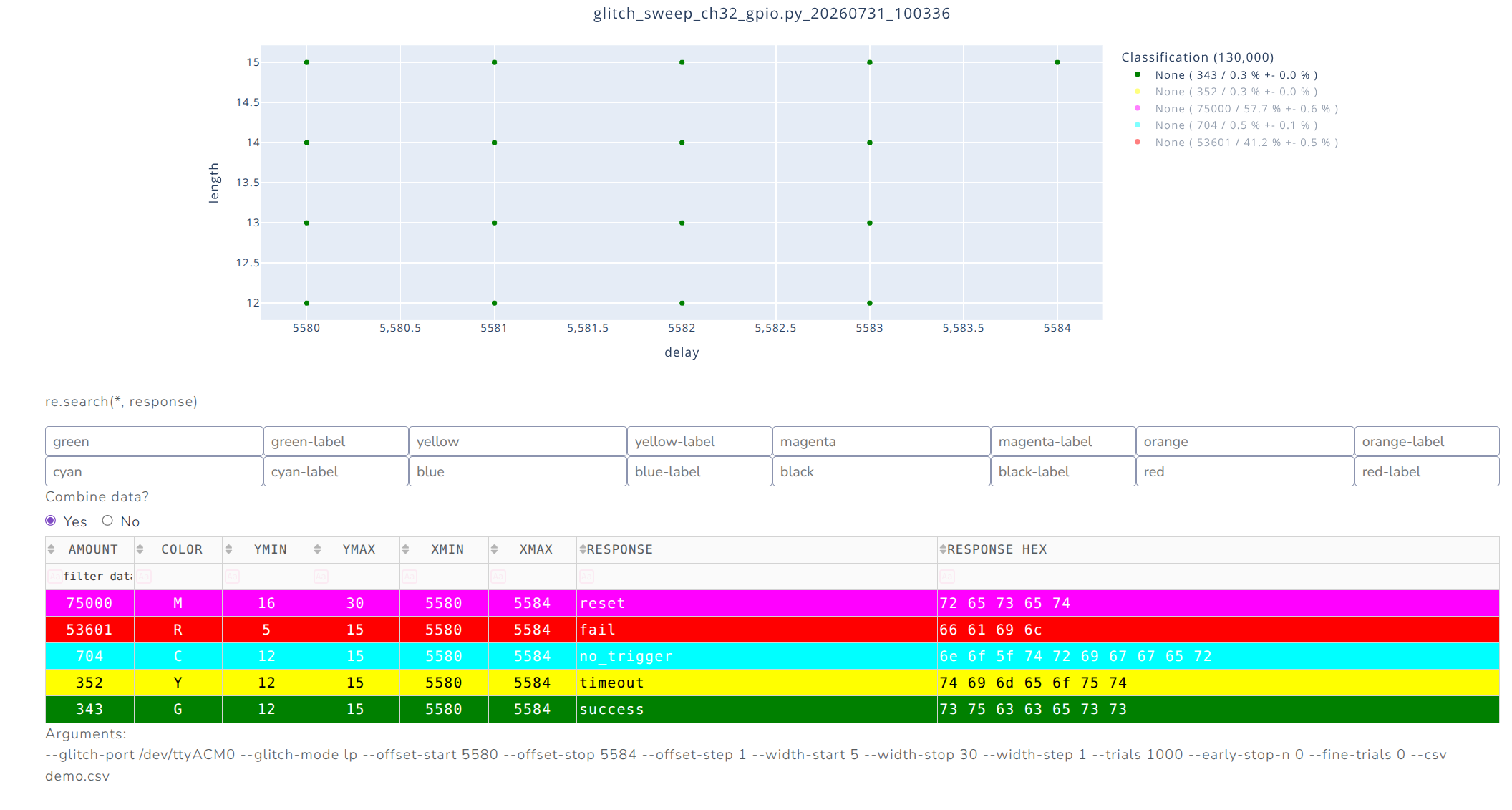
In the next more targeted run:
$ python3 examples/glitch_sweep_ch32_gpio.py --glitch-port /dev/ttyACM0 --glitch-mode lp \
    --offset-start 5580 --offset-stop 5584 --offset-step 1 --width-start 5 --width-stop 30 \
    --width-step 1 --trials 1000 --early-stop-n 0 --fine-trials 0 --csv demo.csv
...
Saved CSV: demo.csv
[+] Total coarse hits: 17
    offset=5580ns width=12ns
    offset=5580ns width=13ns
    offset=5580ns width=14ns
    offset=5580ns width=15ns
    offset=5581ns width=12ns
    offset=5581ns width=13ns
    offset=5581ns width=14ns
    offset=5581ns width=15ns
    offset=5582ns width=12ns
    offset=5582ns width=13ns
    offset=5582ns width=14ns
    offset=5582ns width=15ns
    offset=5583ns width=12ns
    offset=5583ns width=13ns
    offset=5583ns width=14ns
    offset=5583ns width=15ns
    offset=5584ns width=15ns

$ analyzer --directory databases
...
Why Pico Glitcher Helped So Much
What made Pico Glitcher practical for me:
- Low cost, so I could actually buy and use it
- Simple scripting and rapid iteration
- Easy integration with a budget bench setup
- "Good enough" timing control to find real fault windows
For learning + meaningful MCU fault research, it absolutely delivers.
The glitching setup
Yes, the jumper cables could have been a lot shorter (and twisted), the mini-breadboard could have been avoided and so on - all with some more attention and TLC.
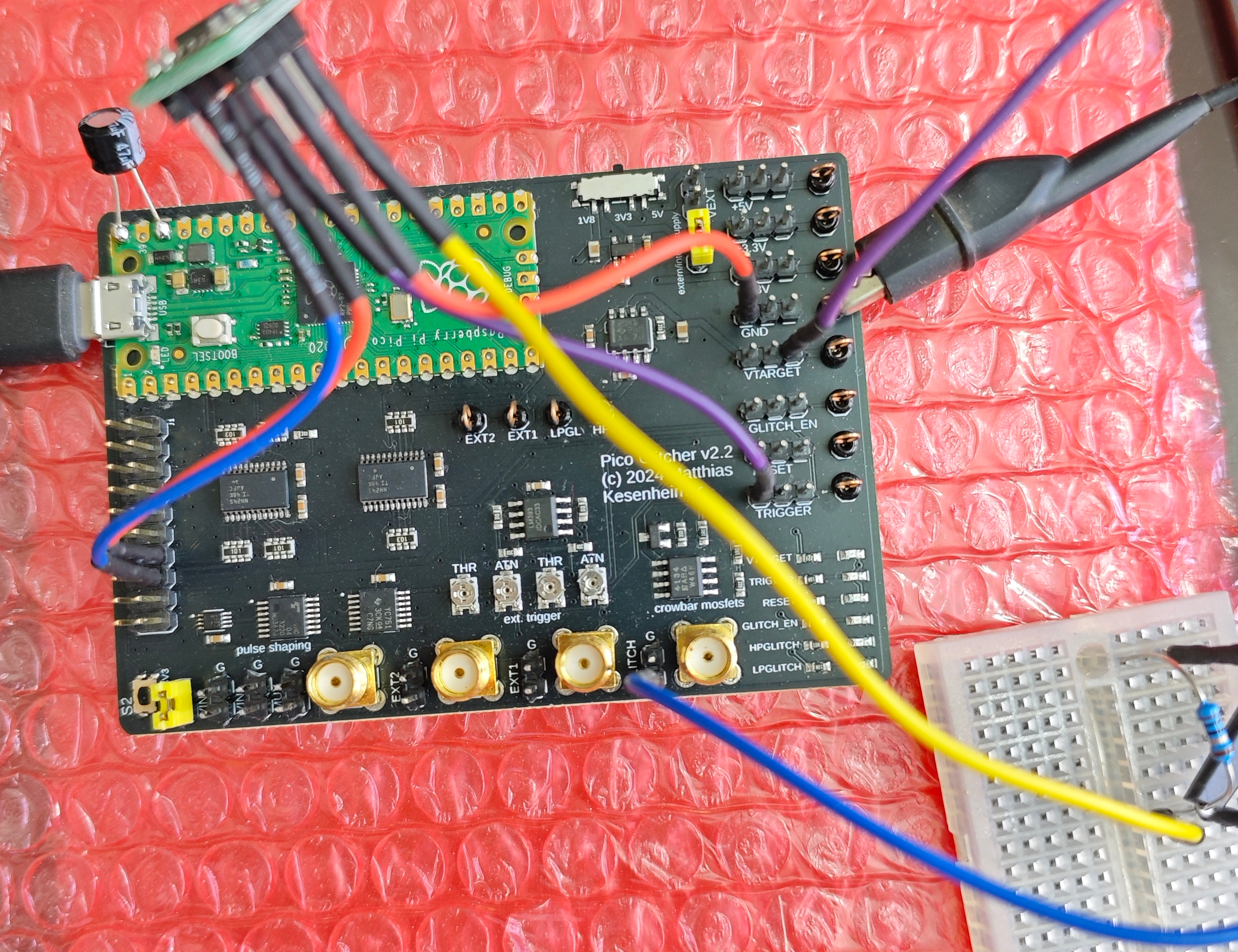
This directly follows from the glitching setup described here.
Connections:
                  +----------------------+
                  |    Pico Glitcher     |
                  |      v2.x board      |
                  |                      |
                  | [VTARGET] ---+-------+------> 10 Ω resistor ->--+------> VTG line
                  |                      |                          |
                  | [GLITCH] ---+---------------> Glitch line ------+
                  |                      |
                  +----------------------+

+--------------------------------------------------+
|                  Target breadboard               |
|                                                  |
|   +-------------------+                          |
|   |     MCU           |  <-- MCU on breakout     |
|   +-------------------+                          |
|        |     |                                   |
|       VDD   GND                                  |
|        |     |                                   |
|   -----+---+-------------------------------------|
|        |     |                                   |
|        |     |                                   |
|        |     |                                   |
|   VTG line  Common GND                           |
+--------------------------------------------------+
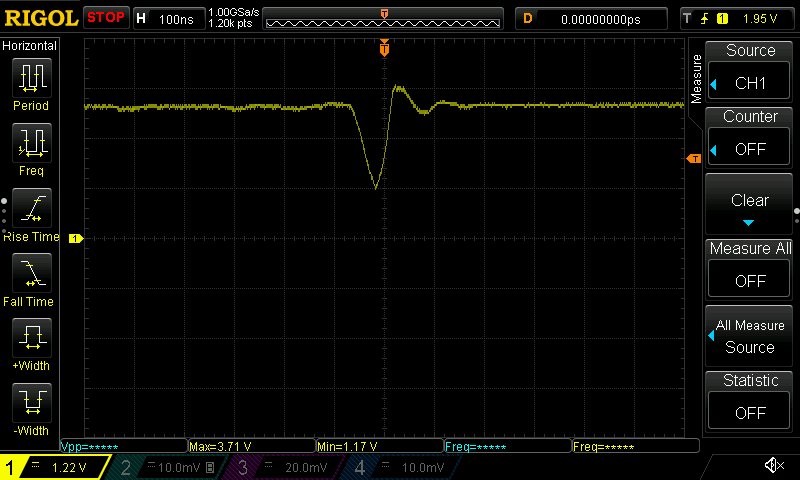
Oscope screen capture:
$ echo ":DISPLAY:DATA? ON,OFF,PNG" | nc -w1 192.168.1.32 5555 | dd bs=1 skip=11 of=scope.png

$ lxi screenshot -a 192.168.1.32 -p rigol-1000z scope-2.png  # alternate from 'lxi-tools' package
Cost/Access Reality Check
Security tooling should not be gated behind high prices and supply-chain luck. Open and affordable tools are critical for independent researchers.
For me, Pico Glitcher converted "I should learn this someday" into "I can test this today."
Gotchas
We could NOT get Pico Glitcher to work on our ASUS ROG Zephyrus G14 laptop
running Ubuntu Linux 25.10 (AMD64). The python pico-glitcher.py --rpico /dev/ttyACM0 --delay 0 0 --length 100 100 would hang within a minute.
Pico Glitcher worked perfectly on a Mac Mini M4 machine, which is where we
had to run our glitching experiments.
Investigation of this problem
We created a light-weight Ubuntu VM to test Pico Glitcher on the same
problematic Linux laptop.
sudo apt-get install qemu-system-x86 cloud-image-utils -y

wget https://cloud-images.ubuntu.com/noble/current/noble-server-cloudimg-amd64.img

qemu-img create -f qcow2 -F qcow2 -o backing_file=noble-server-cloudimg-amd64.img my-vm.qcow2 128G
echo -e "#cloud-config\nusers:\n  - name: ubuntu\n    ssh-authorized-keys:\n      - $(cat ~/.ssh/id_rsa.pub)\n    sudo: ['ALL=(ALL) NOPASSWD:ALL']" > user-data

echo -e "instance-id: my-vm\nhostname: my-vm" > meta-data

cloud-localds seed.iso user-data meta-data

$ lsusb -d 2e8a:0005
Bus 001 Device 015: ID 2e8a:0005 MicroPython Board in FS mode
$ cat launch.sh
qemu-system-x86_64 \
  -machine q35 \
  -cpu host \
  -enable-kvm \
  -m 8G \
  -smp 4 \
  -drive file=my-vm.qcow2,format=qcow2 \
  -cdrom seed.iso \
  -net nic -net user,hostfwd=tcp::2222-:22 \
  -device qemu-xhci,id=xhci \
  -device usb-host,hostbus=1,hostaddr=15
ssh -p 2222 ubuntu@localhost
Follow https://fault-injection-library.readthedocs.io/en/latest/getting_started/ inside the VM.
$ uname -a
Linux ubuntu 7.0.0-rc3 #5 SMP PREEMPT_RT Thu Mar 12 03:19:57 UTC 2026 x86_64 x86_64 x86_64 GNU/Linux

(.venv) ubuntu@ubuntu:~/my-fi-project$ python pico-glitcher.py --rpico /dev/ttyACM0 --delay 0 0 --length 100 100
[+] Version of Pico Glitcher: [1, 13, 1]
[+] Version of findus: [1, 13, 1]
[+] Experiment 0	0	(NA)	100	0	G	b'Trigger ok'
[+] Experiment 1	0	(1)	100	0	G	b'Trigger ok'
[+] Experiment 2	0	(2)	100	0	G	b'Trigger ok'
[+] Experiment 3	0	(3)	100	0	G	b'Trigger ok'
[+] Experiment 4	0	(4)	100	0	G	b'Trigger ok'
[+] Experiment 5	0	(5)	100	0	G	b'Trigger ok'
[+] Experiment 6	0	(6)	100	0	G	b'Trigger ok'
[+] Experiment 7	0	(7)	100	0	G	b'Trigger ok'
[+] Experiment 8	0	(8)	100	0	G	b'Trigger ok'
[+] Experiment 9	0	(4)	100	0	G	b'Trigger ok'
[+] Experiment 10	0	(5)	100	0	G	b'Trigger ok'
[+] Experiment 11	0	(5)	100	0	G	b'Trigger ok'
[+] Experiment 12	0	(6)	100	0	G	b'Trigger ok'
[+] Experiment 13	0	(6)	100	0	G	b'Trigger ok'
[+] Experiment 14	0	(7)	100	0	G	b'Trigger ok'
[+] Experiment 15	0	(7)	100	0	G	b'Trigger ok'
[+] Experiment 16	0	(8)	100	0	G	b'Trigger ok'
[+] Experiment 17	0	(8)	100	0	G	b'Trigger ok'
...
<Goes on just fine>
What's Next
Trying this approach on more complex MCUs and secure boot targets.
I am also tempted to build my own findus-compatible glitching hardware board
using RPi Pico 2 for 3.3V targets (as a starting point).
In India, a ChipWhisperer Husky setup costs roughly ₹1 lakh, while our platform costs about ₹1,000 - around 100X less.
Future‑me will probably regret promising a 100X‑cheaper Husky "competitor" in public, but here we are ;(
Update (June-2026):
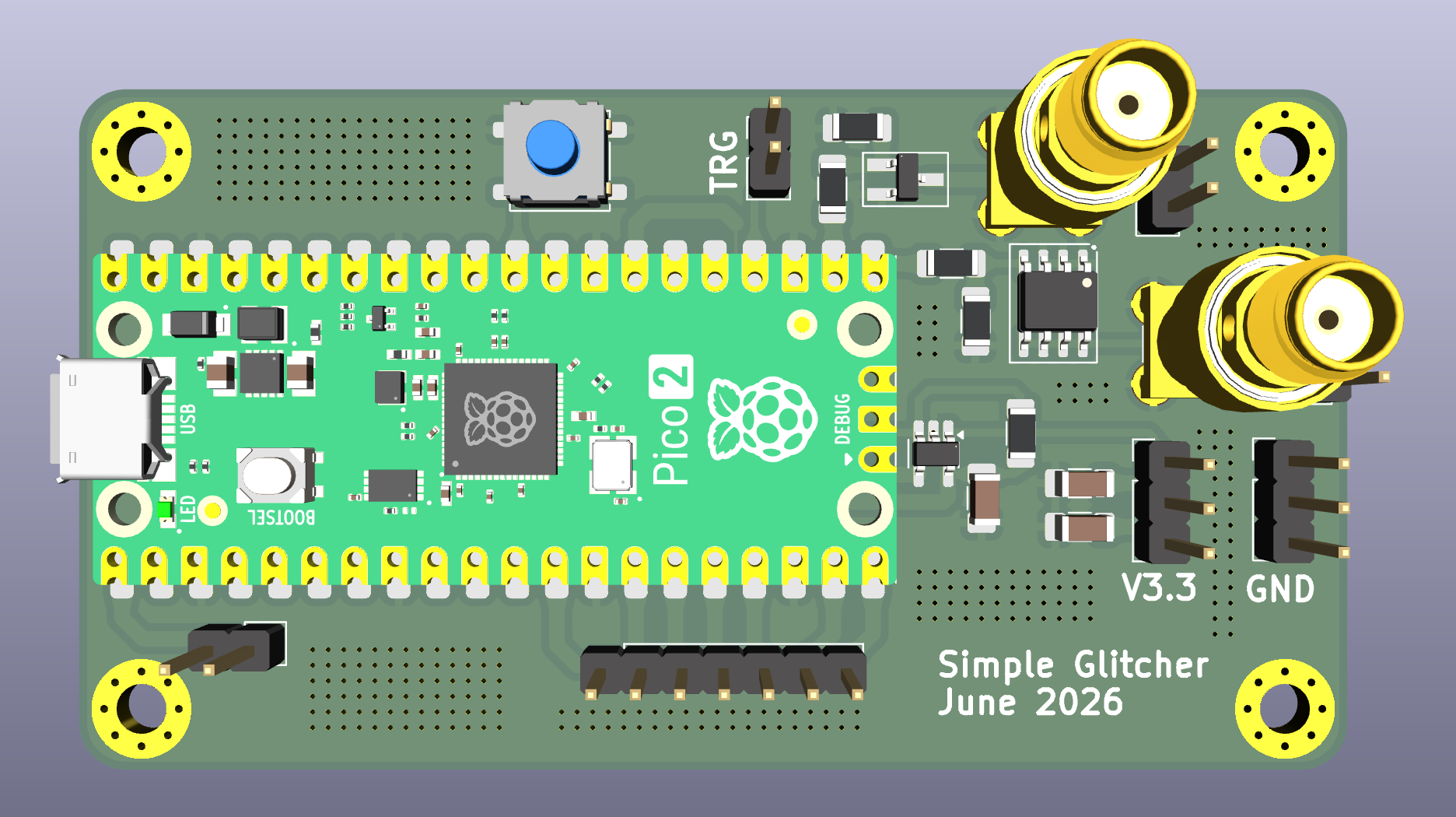
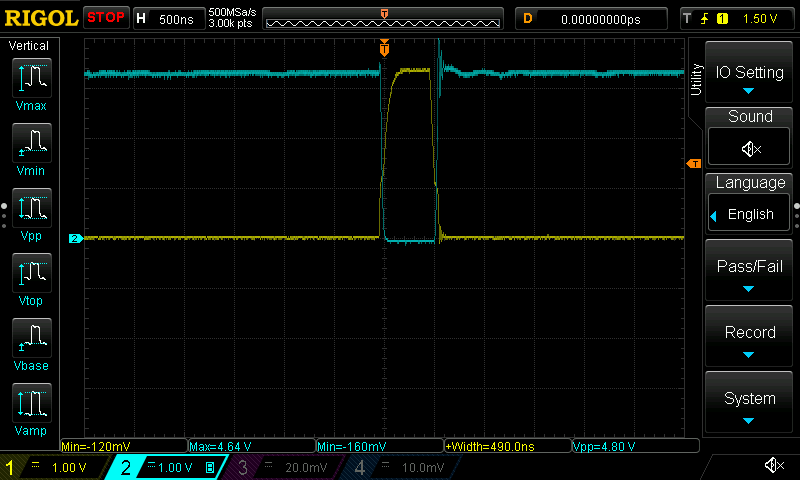
It works! ;)
The SimpleGlitcher v0 board was able to glitch CH32V003J4M6 successfully!
Update (August-2026):
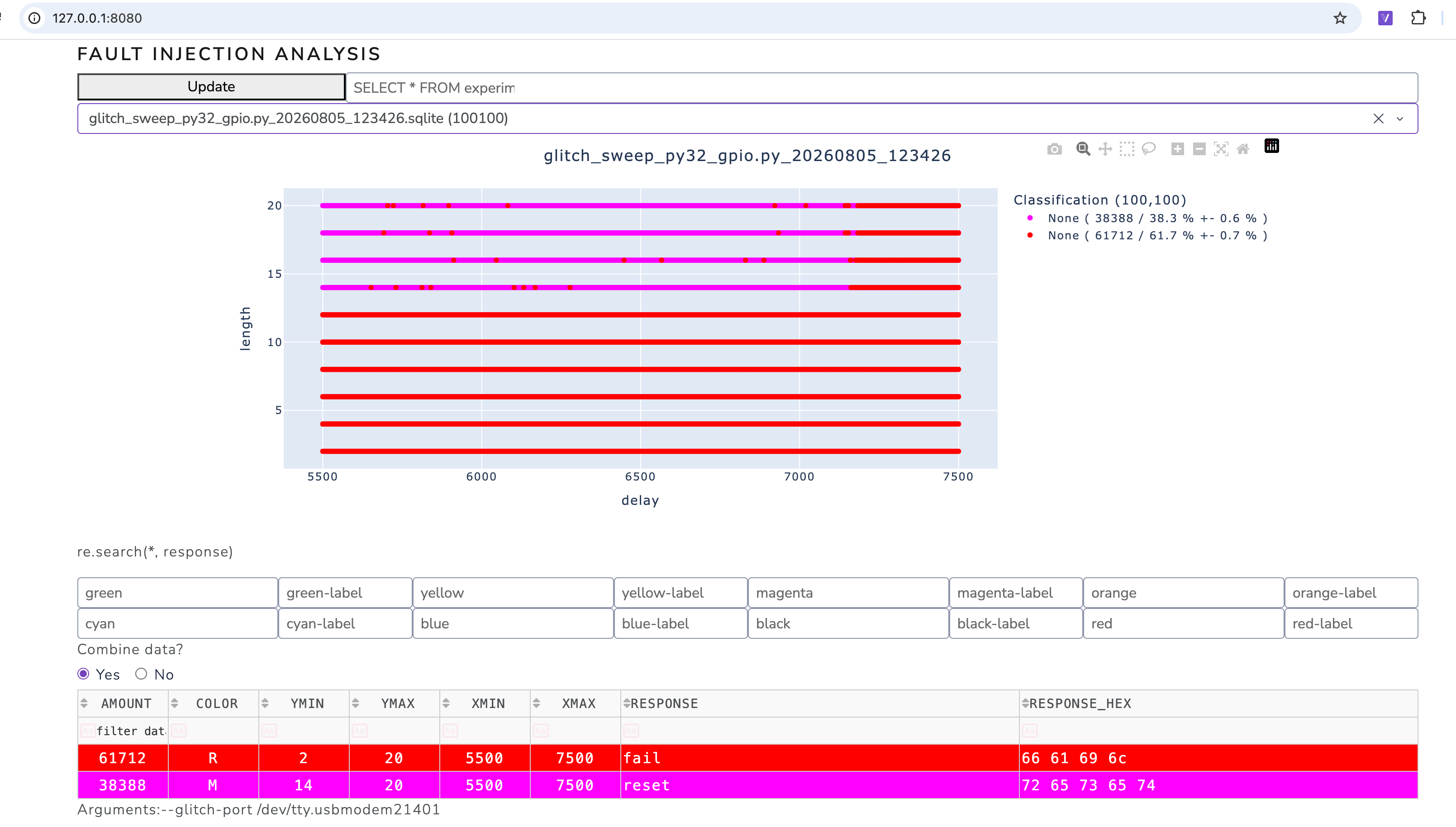
I have NOT been able to glitch PY32F003 SOP-8 chip using this method so far -
so I will explore EMFI attacks next using the FaultyCat EMFI platform!
Regarding PY32F003 SOP-8 chip: It seems the on-chip wide-voltage internal regulation, strong reset supervision, a slower SOP-8 clock limit, and separated flash/core behavior combine to make the useful voltage-fault window exceptionally narrow and hard to reach!
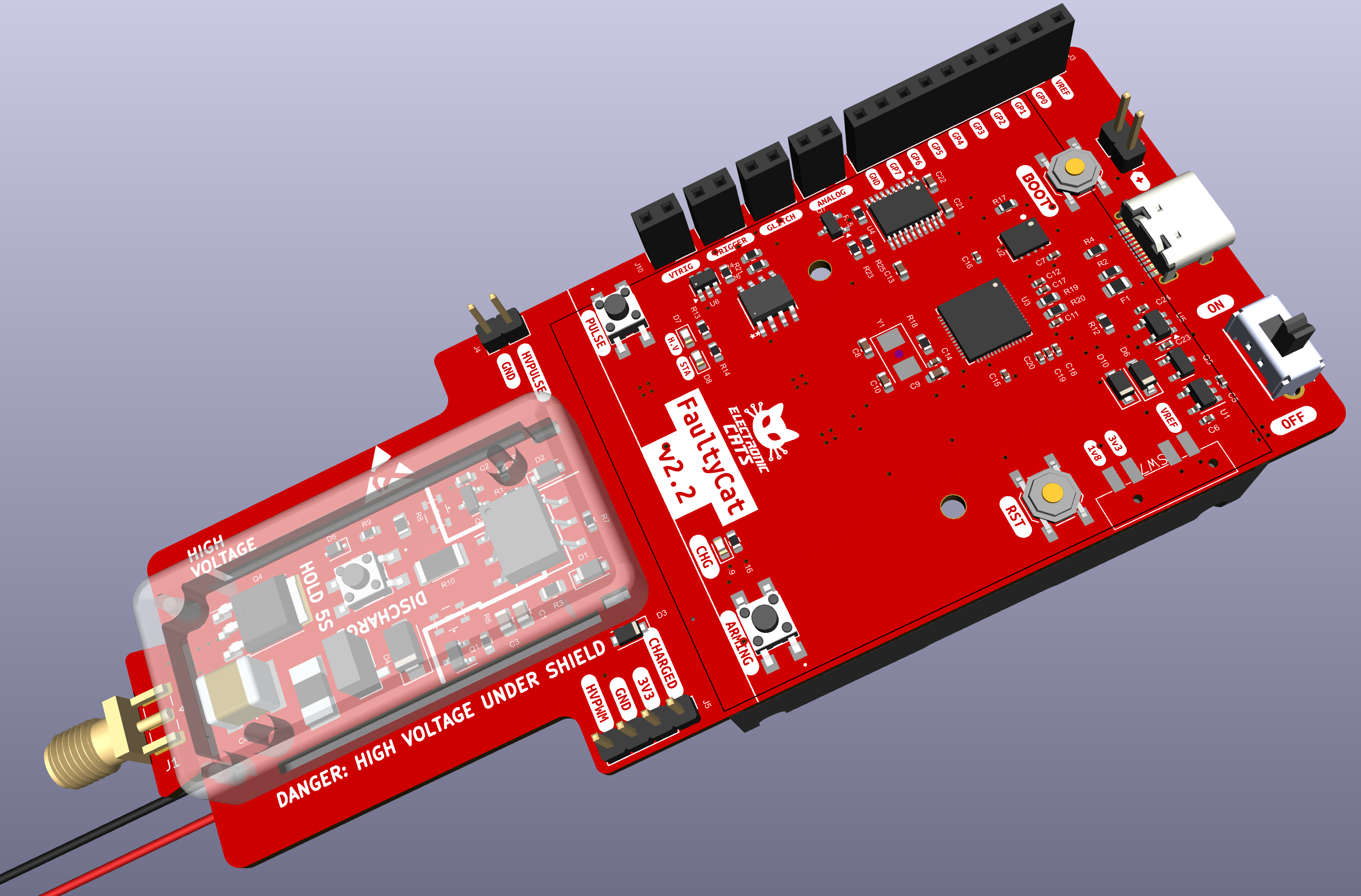
We do live in exciting times ;)
References
https://github.com/kholia/fault-injection-library (has
glitch_sweep_ch32_gpio.pyand other stuff)https://github.com/kholia/FaultyCat - The 2K INR (?) EMFI platform
https://fault-injection-library.readthedocs.io/en/latest/getting_started/
https://github.com/cnlohr/ch32fun (awesome stack for 'ch32')
https://github.com/IOsetting/py32f0-template (the best 'sdk' for PY32)
https://github.com/kholia/avr-glitch-101 - My earlier AVR glitch toy project ("under-glitching" technique!)
https://robu.in/product/newae-nae-cwhusky-sk1-ic-development-tool-kit/
https://chiptron.eu/hacking-the-py32-extracting-firmware-from-a-cheap-aliexpress-led-toy/
https://github.com/kholia/zmu - With support for running and glitching Puya PY32F003 firmwares!